
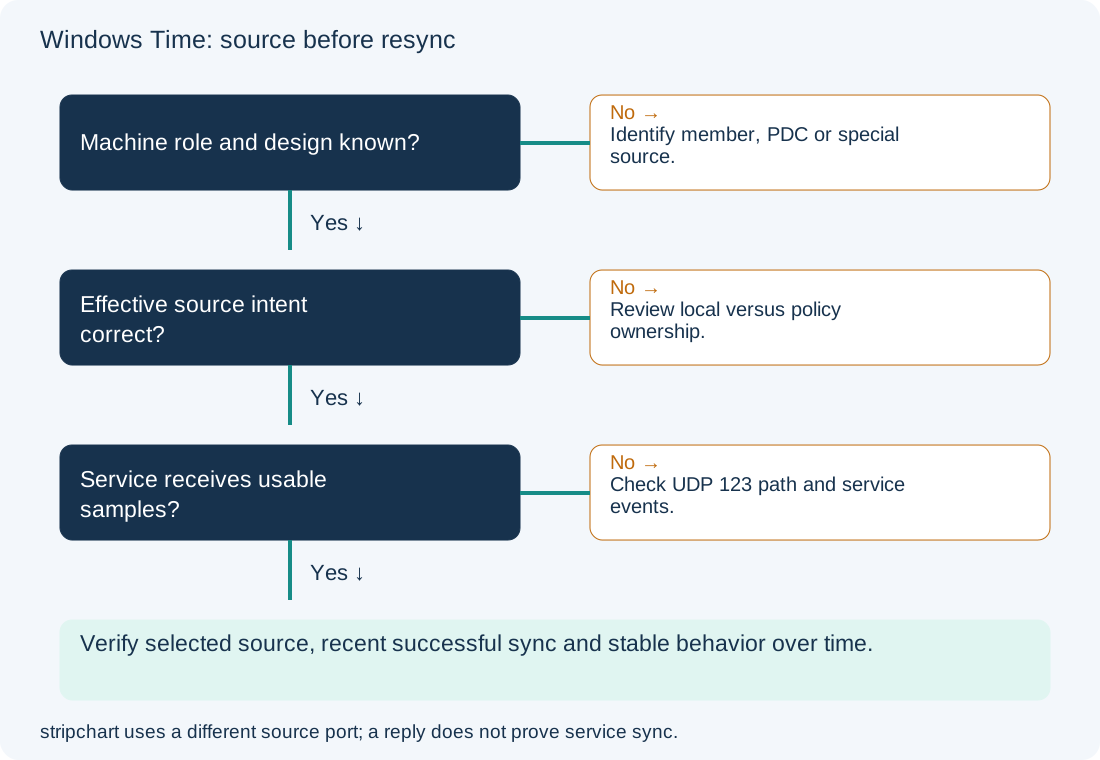
A clock can display the right local hour while using an unintended source, or display a different hour because the time zone is wrong while UTC synchronization is healthy. Start with the selected source, last successful synchronization and effective configuration. Repeatedly running resync against the wrong source cannot repair the hierarchy.
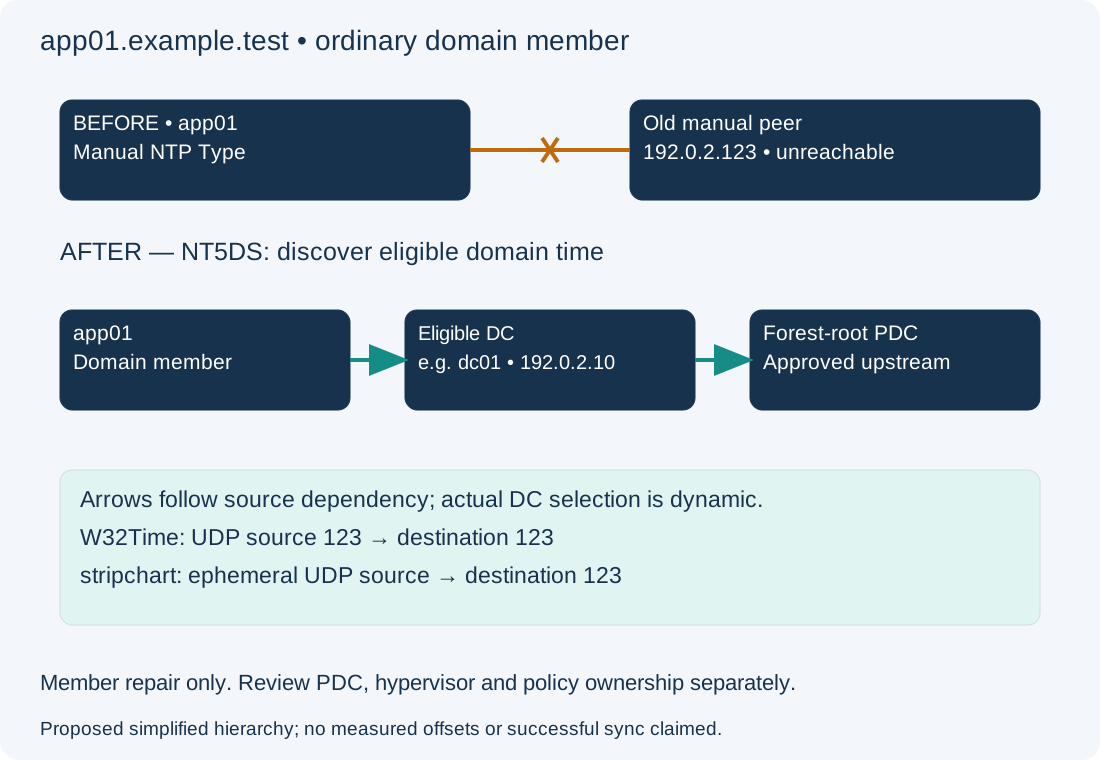
Scope and evidence: Proposed Windows Server 2022/2025 domain member app01.example.test using Windows PowerShell 5.1 and W32Time. The intended domain is example.test; dc01.example.test at 192.0.2.10 is an illustrative candidate DC. An old manual peer 192.0.2.123,0x8 is unreachable. All addresses are documentation examples; no live offset measurements or successful synchronization are claimed. This is a member-server correction, not a forest-root PDC configuration recipe.
Identify the Windows Time Role: Domain Member, DC or Root PDC
Ordinary AD members normally discover time through the domain hierarchy. The forest-root PDC emulator needs an approved authoritative source outside that hierarchy; pointing it back into its own downstream chain can create a dependency loop. The drawing is simplified: a member can choose an eligible DC, and a multi-domain forest has additional selection rules. Virtualized machines may also have a hypervisor time provider that needs investigation rather than blanket removal.
Check W32Time Source, Status, Peers and Effective Policy
On the affected member server, elevated read-only commands:
Get-Service W32Time
Get-TimeZone
w32tm /query /source
w32tm /query /status /verbose
w32tm /query /configuration
w32tm /query /peers
Record the source, last successful sync, stratum, leap indicator, peer state and configured Type. In the proposed fault, a manual NTP type and stale peer explain why the member is not following domain discovery. A local oscillator, VM provider or unexpected peer is a clue, not an automatic command to disable it. Configuration indicates intent; status indicates what is actually being used. A timezone adjustment is separate from a UTC offset correction.
| Evidence | Interpretation | Next checkpoint |
|---|---|---|
| Manual NTP Type on an ordinary member | Possible retained standalone configuration | Determine whether local configuration or policy owns it |
| NT5DS with no recent sync | Hierarchy discovery or acceptance may be failing | Check domain discovery, UDP path and events |
| Intended source but persistent offset | Samples, source quality or correction limits need review | Compare several observations and service events |
| Hypervisor provider selected | VM integration affects source selection | Review the virtualization/time design with its owner |
Inspect (Policy) versus (Local) settings in the configuration output. If domain policy controls the source, a local override can be ineffective or temporary. Generate an effective computer policy report as a local file-writing diagnostic, not a configuration change:
gpresult /scope computer /h "$env:TEMP\time-computer-policy.html" /f
nltest /dsgetdc:example.test
Expected evidence is the winning Windows Time policy and a discovered DC. A successful DC locator query does not prove that NTP is reachable. Use the AD DNS guide for discovery failures and the GPO guide for ownership.
Compare w32tm Stripchart Probes with W32Time UDP Traffic
Use the discovered eligible source, not an arbitrary public server. This bounded measurement probe sends packets but does not set the clock:
w32tm /stripchart /computer:dc01.example.test /dataonly /samples:5
Expected output is a short series of offset samples or explicit errors. Samples show that this probe received time replies; they do not prove W32Time adopted that source or accepted its samples. stripchart uses an ephemeral UDP source port; the built-in W32Time client uses UDP source port 123. Both target UDP 123. A firewall/NAT path can therefore allow the probe and block service traffic. Test-NetConnection -Port 123 is a TCP test and cannot validate NTP.
When authorized, correlate a bounded capture of the actual service request/reply with the source host and network policy. Also check source health and domain authentication prerequisites. Do not conclude that opening an arbitrary inbound UDP rule on every member will repair it. Microsoft documents the command and port distinctions in Windows Time tools and settings.
Read recent service events on the member:
$since = (Get-Date).AddHours(-2)
Get-WinEvent -FilterHashtable @{LogName='System'; ProviderName='Microsoft-Windows-Time-Service'; StartTime=$since} -ErrorAction Continue |
    Select-Object TimeCreated, Id, LevelDisplayName, Message
Record source-selection, no-data and correction-limit messages if present. No matching records do not establish success; logging and the observation window matter. Large offsets need an application-aware recovery plan because clock steps can affect authentication, scheduled work, logging and databases. Do not widen correction limits simply to suppress an error. Microsoft’s time-service architecture explains the underlying selection and correction behavior.
Restore an Approved Domain Member to NT5DS Hierarchy
Configuration/operational change — app01 only. Confirm it is not a DC/PDC and not intentionally using an approved special source. Save the original query output and policy report. The lab baseline is a locally owned manual NTP setting; no GPO overrides it. Confirm the domain hierarchy is healthy and assess the clock correction’s impact first.
w32tm /config /syncfromflags:domhier /update
w32tm /resync /rediscover
The first command selects domain-hierarchy synchronization; the second asks for rediscovery and synchronization. They do not repair an unhealthy upstream DC. A command reporting success only confirms that the request/configuration operation completed, not that the clock now meets the application’s accuracy requirement. Do not unregister/reregister W32Time or mark the member as a reliable domain time source as a generic fix.
Verify Windows Time Source, Sync Age and Stable Offset
Repeat source, status and configuration queries after synchronization has had time to occur. Expected lab evidence is NT5DS intent, an eligible domain source and a fresh successful sync, with offset observations appropriate to the environment. Check again over multiple polls and confirm the relevant authentication/application behavior. A single near-zero measurement is insufficient evidence of a stable source.
If rollback is required, restore the recorded local manual baseline only; this example assumes the exact old peer and flags recorded above:
w32tm /config /manualpeerlist:"192.0.2.123,0x8" /syncfromflags:manual /update
That restores the known faulty source selection and is containment, not a healthy final state. It does not undo a clock correction already applied. Coordinate any required clock recovery separately; do not force repeated time jumps. A policy-owned baseline must be restored through policy. Prevent recurrence by monitoring source changes and sync age, documenting PDC ownership, and reviewing time behavior when moving a VM or changing domain policy.