Networking and Network Engineering
- Cisco Packet Tracer, GNS3 and EVE-NG labs
- Routing, switching, VLANs, OSPF and BGP
- NAT, ACLs and campus network design
- Data center architecture and monitoring
- Connectivity and configuration troubleshooting
Pakistan · University computing projects
Turn project roadblocks into practical understanding.
Get practical technical guidance for university final year projects, networking labs, cybersecurity projects, AI/ML applications, Python automation, Linux environments, and software development.
From project requirements and architecture to implementation troubleshooting, testing, documentation guidance, and viva preparation.
Guidance with Imran Sarwar · View profile & credentials
Explore my project portfolio →

Find your technical starting point
Bring a final year project, semester project or computing lab. We first review your requirements and current progress, then agree on the specific guidance that is feasible.
Not sure which tools your project needs?
Share your brief and the problem you want to solve.
Virtual University students
Studying CS, IT, SE or a related computing program at VU? Bring your CS619 brief, supervisor feedback and submission milestones. The discussion starts with what your current project actually requires.
Students from other Pakistani universities are also welcome. The support is tailored to your technical scope and university requirements.
Discuss Your VU ProjectSaif Way Tech is an independent technical guidance service. It is not affiliated with, approved by or endorsed by Virtual University of Pakistan or any other university.
VU student support →A clear support process
Send your project title, university, degree program, project brief, technical requirements, current progress and deadline.
Discuss the technologies, feasibility, blockers and support needed. Availability, scope and any fees are agreed before work begins.
Work through the agreed troubleshooting, implementation mentoring, architecture review or development environment setup.
Understand your implementation, check functionality, interpret results and practise explaining your design for a demonstration or viva.
This is mentoring and technical support, not a service for completing assessed work on your behalf. You develop, understand and submit your own work under your university’s rules.
Support at each milestone
Bring the template and marking requirements supplied by your university. Each phase should connect requirements to design decisions, working features and evidence from tests.
Phase 1 · Requirements
Define the problem, stakeholders, scope, actors and use cases. Separate functional requirements from security, performance and other non-functional requirements. Record assumptions, dependencies and measurable acceptance criteria.
Bug-hunting example: specify authorized APK input, supported analysis scope, report fields and failure cases. Distinguish static findings from issues that require manual validation.
Review output: a requirements checklist and traceability IDs that can be mapped to design and tests.
Phase 2 · Architecture
Map requirements to components, interfaces, data flows and database entities. Review use-case, sequence and deployment diagrams, API contracts, authentication, error handling and trust boundaries.
Bug-hunting example: separate APK intake, analysis workers, findings storage and reporting. Define safe file handling, worker isolation and authorization for any device interaction.
Review output: a coherent architecture and module plan that explain how each requirement will be implemented.
Phase 3 · Working slice
Set up the development environment, pin dependencies, implement a small end-to-end workflow and test it with representative inputs. Debug reproducible errors before expanding features.
Bug-hunting example: demonstrate a permitted sample APK moving through intake, one scoped analysis step and a basic report. Label fixture results and avoid presenting a prototype as a complete vulnerability scanner.
Review output: a runnable prototype, setup instructions, test inputs and an explicit list of limitations.
Phase 4 · Verification
Trace tests back to SRS requirements. Check integration, negative inputs, access controls and recovery paths. Prepare installation instructions, a user guide, known issues, a reproducible demonstration and a clean source package.
Bug-hunting example: explain false positives, unsupported APKs, analysis failures and the boundary between automated findings and validated vulnerabilities.
Review output: a submission checklist, test evidence and practice explaining your own technical decisions.
These are illustrative milestones for the proposed Intelligent Bug Hunting Platform, not claims of completed deliverables. You write and submit your own assessed work; support focuses on review, understanding and troubleshooting.
Explore the work behind the guidance
These examples link to existing Saif Way Tech project pages. Read each page for its implementation status, evidence and limitations; proposed platforms are labelled separately from lab work.
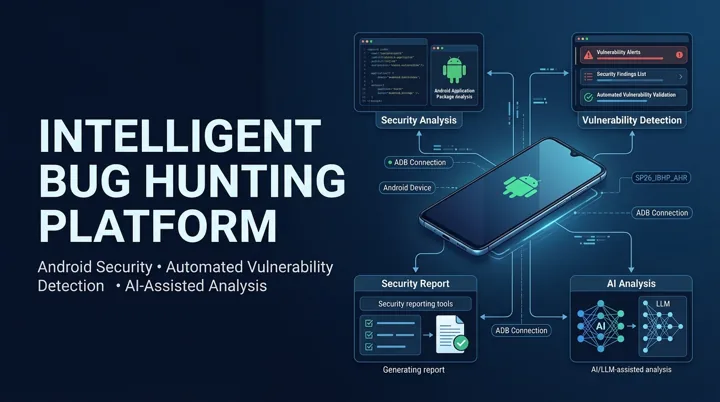
Android security · Proposed platform
Explore a proposed Android security assessment architecture, module design and validation workflow. This is a project proposal, not evidence of a completed deployed platform.
Technologies: Python · Android · ADB · AI-assisted analysis

AI/ML · Simulated network lab
Review a documented approach combining simulated enterprise traffic, packet analysis, machine learning and a security dashboard.
Technologies: Python · Flask · GNS3 · Wireshark
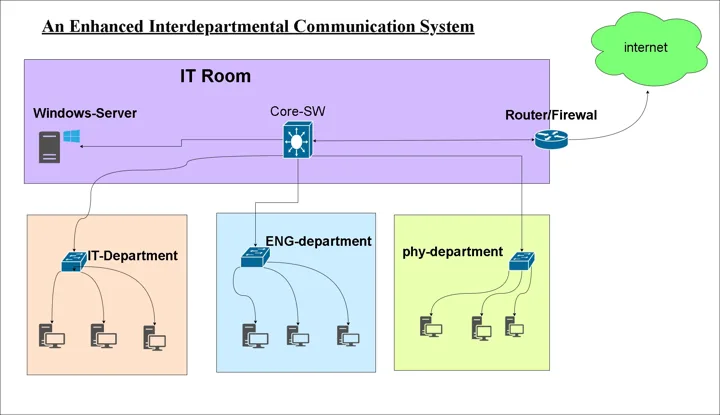
Networking · Infrastructure lab
Explore a campus lab covering VLAN segmentation, OSPF, Active Directory, DHCP/DNS and firewall-based separation.
Technologies: GNS3 · VLANs · OSPF · Fortinet · VMware

Python · Network automation lab
Inspect lab scripts for inventory processing and vendor-specific configuration workflows, including their verification limits.
Technologies: Python · Netmiko · Device inventory

Cybersecurity · PKI and identity
Read the certificate management project covering issuance, revocation, directory integration and role-based access.
Technologies: Step CA · OpenLDAP · RBAC · PKI
Match the tools to the requirements
Bring your required stack and versions. Support is assessed per project; this list is not a promise of compatibility with every platform or a certification claim.
Cisco · Packet Tracer · GNS3 · EVE-NG
Python · Flask · Django · JavaScript
Kali Linux · Wireshark · Nmap · Fortinet · Palo Alto
PyTorch · scikit-learn · Ollama
Ubuntu · Linux · VMware · Docker · Nginx
MySQL · PostgreSQL · SQLite
Before you get in touch
Contact Saif Way Tech for independent online technical guidance. Share your brief, university, tools and current progress so Imran Sarwar can assess whether the topic fits his experience and availability.
Yes, VU students can discuss CS619 requirements, project scope, setup, debugging, documentation structure and viva preparation. Bring your current brief and supervisor feedback. Saif Way Tech is independent of Virtual University.
Support can include architecture reviews, implementation mentoring and troubleshooting specific blockers. You remain responsible for developing, understanding and submitting your own assessed work.
Share your topology, addressing plan, required protocols and sanitized configurations. Guidance can cover routing, VLANs, NAT, ACLs and verification, with simulator or image limitations discussed first.
Requests can cover installation, virtual machines, networking, SSH, Python environments, Docker and web server setup. Include your OS version, environment and the exact error.
Share a minimal reproducible example, package versions, expected behavior and sanitized error output. Sessions can focus on application logic, APIs, databases, environments and deployment problems.
Discuss dataset preparation, preprocessing, classification, evaluation, AI dashboards or local LLM integration. Feasibility depends on your dataset access, hardware and university requirements; model accuracy is not guaranteed.
Bring your requirements and draft diagrams for a review of actors, use cases, module boundaries, data flows and database relationships. Guidance helps you explain and refine your own design.
Review your setup, test cases, results and design decisions, then practise explaining them. Support does not include impersonation, attending an assessment for you or guaranteed academic results.
Use a WhatsApp button to open a prepared message, fill in your university, degree program, project title, domain, support needed and deadline, then review and send it yourself. Do not send passwords, access tokens or private datasets.
Start with the problem you need to solve
A clear brief makes the first conversation useful. Open the WhatsApp message, add your details and review it before sending.
Student project contact: +92 314 6809271. Availability, scope and fees are confirmed after review. No guaranteed grades or academic outcomes.
Share sanitized error output or a public repository link when useful. Keep passwords, tokens and private data out of your message.
Prepare your details here, then review and send them in WhatsApp. Files stay on your device until you share them.