Enterprise Private PKI Made Simple
WCAMAN provides organizations with a centralized web portal for issuing, approving, downloading, renewing, and revoking internal digital certificates. The solution is deployed securely inside the customer's own infrastructure and can integrate with an existing directory service.
Deployed inside your infrastructure. Your certificate authority, keys, users, and certificate data remain under your control.
Internal Certificate Management Should Not Depend on Manual Processes
Many organizations still depend on manual certificate generation, spreadsheets, and disconnected approval processes. This creates operational risk and makes certificate ownership difficult to track.
A Centralized Portal for Your Internal Certificate Authority
WCAMAN gives users and administrators separate workflows while keeping certificate issuance under controlled administrative approval.
User sign-in
A user signs in using approved directory credentials.
CSR request
The user submits or generates a Certificate Signing Request.
Admin review
The request appears in the administrator dashboard for review.
Approval
The administrator approves or rejects the request.
Issuance
The internal CA issues the certificate after approval.
Download
The authorized user downloads and uses the certificate.
Lifecycle
Administrators monitor, renew, or revoke certificates when required.
Key Features
Centralized Administration
Manage users, certificate requests, issued certificates, renewals, and revocations from one portal.
Certificate Approval Workflow
Allow users to submit CSRs while administrators maintain control over certificate issuance.
Private Certificate Authority
Use an internal certificate authority to issue certificates for trusted organizational services and users.
LDAP Integration
Authenticate and manage users using an existing LDAP-compatible directory.
Active Directory Integration
Active Directory connectivity can be included as part of a customized customer deployment, depending on environment and project scope.
Built-In Directory Option
Provide an included LDAP directory for organizations that do not have an existing identity directory.
Certificate Lifecycle Management
Issue, approve, download, renew, revoke, and track internal certificates.
Audit Visibility
Maintain records of certificate and administrative actions for operational review.
Customer-Controlled Deployment
Deploy the solution inside the organization's VM, Linux server, or supported container environment.
Customized Branding and Configuration
Configure customer name, CA name, internal domain, portal URL, organization details, certificate settings, and deployment parameters.
Where WCAMAN Can Be Used
Service-specific integration depends on the deployment scope and customer environment.
Flexible Deployment Inside Your Infrastructure
The exact deployment method is confirmed during the technical assessment.
Virtual Machine Appliance
Deploy WCAMAN in a dedicated virtual machine hosted on VMware, Hyper-V, Proxmox, VirtualBox, or another supported virtualization platform.
Existing Linux Infrastructure
Install and configure WCAMAN on a customer-provided supported Linux VM or physical server.
Containerized Deployment
Deploy the application through Docker or Docker Compose where container deployment is appropriate for the customer environment.
Use Your Existing Directory or Deploy a Dedicated One
Existing Active Directory
Connect WCAMAN to the organization's Microsoft Active Directory environment through an approved service account and configured directory settings.
Existing LDAP Directory
Integrate with the customer's current LDAP-compatible identity directory.
Included LDAP Directory
Deploy a dedicated LDAP service together with WCAMAN when the customer does not already operate a directory service.
Directory integration, authentication rules, user synchronization, and access control are configured according to the customer's environment and security policies.
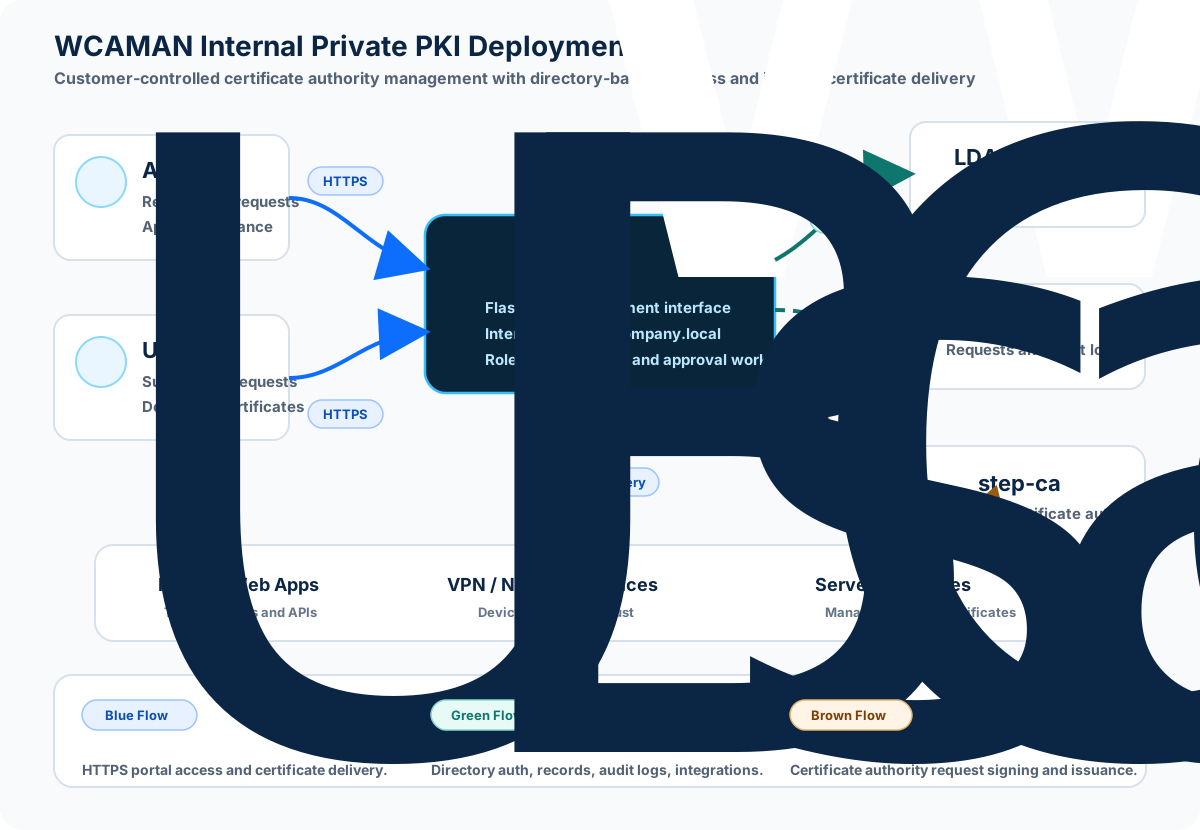
Private PKI Deployment Architecture
See WCAMAN in Action
Watch the demonstration to see the administrator and user workflows, certificate request approval, issuance, and certificate download process.
Typical Private PKI Deployment Scope
Final project scope and pricing depend on user count, identity integration, certificate use cases, infrastructure readiness, security requirements, and the number of services being integrated.
Why Work With Saif Way Tech
Practical IT Experience
Hands-on enterprise IT, infrastructure, NOC/DC, and troubleshooting experience.
Networking and Cybersecurity Knowledge
Understanding of network security, identity, PKI, and operational controls.
Windows and Linux Environments
Deployment planning across Linux systems and Windows-oriented identity environments.
Certificate Management Focus
Experience combining PKI concepts with web-based certificate lifecycle workflows.
Customized Deployment
Configuration is planned around the customer's existing infrastructure and security policies.
Documentation and Handover
Clear deployment notes, administrator guidance, and technical handover are included in scope.
UAE-Based Consultation
Technical consultation and support from Saif Way Tech for regional organizations.
Infrastructure Automation Mindset
Experience combining infrastructure engineering with practical software automation.
WCAMAN Interface Preview
A closer look at administrator and user workflows, certificate request handling, approval status, certificate details, and directory-backed access.
Backend Service Health Checks
WCAMAN checks whether required backend services are reachable from the application VM, including LDAP directory services, step-ca certificate authority services, and configured supporting services. Online status confirms the portal can reach those service endpoints; offline status helps administrators identify service availability, network, or configuration issues.
Common Questions
What is a Private PKI?
A Private PKI is an internal certificate authority system used to issue and manage trusted certificates for an organization's private services, users, devices, and applications.
Is WCAMAN hosted on the public internet?
No. WCAMAN is positioned as an internal deployment inside customer-controlled infrastructure.
Can WCAMAN be deployed inside our existing infrastructure?
Yes. It can be deployed inside a VM, supported Linux server, or suitable container environment depending on assessment.
Can it integrate with Active Directory?
Active Directory integration is available as a customizable deployment option based on the customer's directory structure and access policies.
Can we use an existing LDAP directory?
Yes. WCAMAN can integrate with an existing LDAP-compatible directory when the required service account, schema, and access rules are available.
What if our organization does not have LDAP or Active Directory?
A dedicated LDAP directory can be deployed together with WCAMAN for customers without an existing directory service.
Can the portal use our internal domain name?
Yes. The portal can be configured with an internal DNS name such as pki.company.local or another customer-approved name.
Can certificates be issued for internal websites and services?
Yes. Certificates can be issued for internal HTTPS websites, servers, devices, APIs, and selected services depending on the deployment scope.
Is ACME automation available?
ACME automation is planned and may be available as a customized enhancement depending on the deployment scope.
Do you provide deployment and administrator training?
Yes. Basic administrator training, documentation, and final handover are included in a typical deployment scope.
Will Saif Way Tech receive our private CA keys?
The recommended deployment keeps the certificate authority and private keys inside the customer-controlled environment. Access and operational responsibilities are agreed during the deployment.
Can the platform be customized for our organization?
Yes. Branding, CA name, internal domain, organization details, certificate settings, and deployment parameters can be configured according to scope.
Planning an Internal Private PKI?
Request a technical discussion and live demonstration to evaluate how WCAMAN can be deployed within your organization's current infrastructure.