
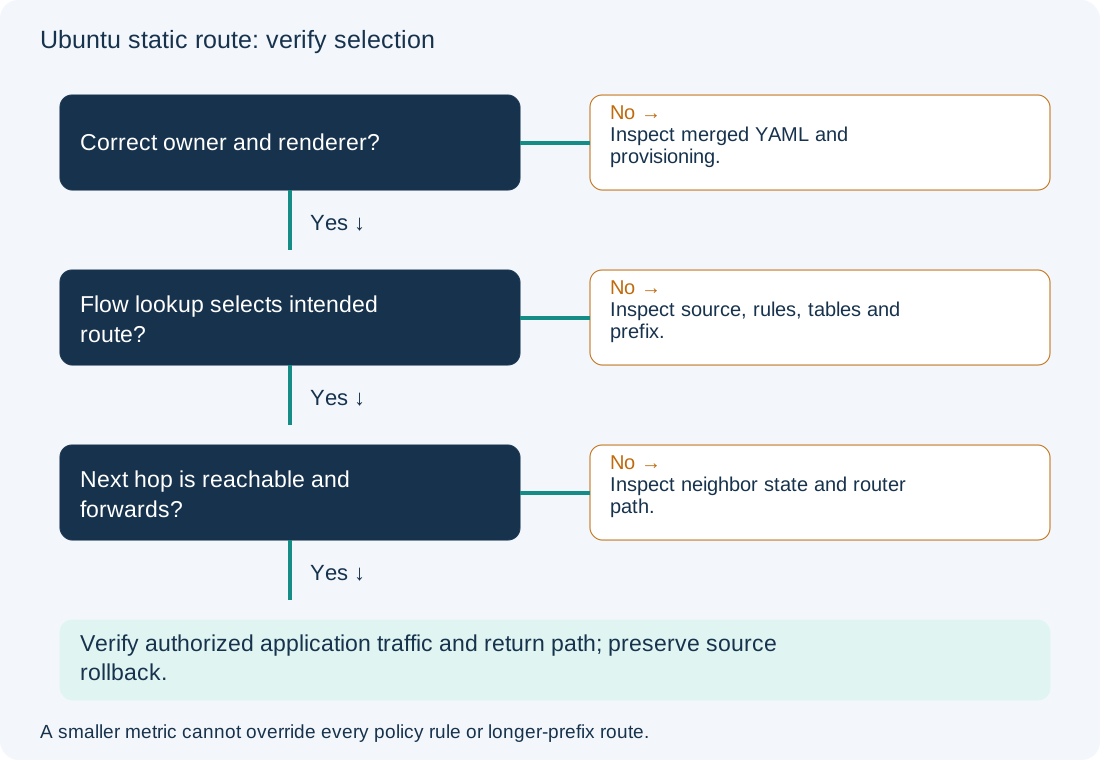
A route written in YAML is not necessarily the route the kernel uses. It may belong to the wrong interface or renderer, be overridden by merged configuration, or sit in a table that policy rules do not consult. Check the effective source/destination lookup before lowering metrics or replacing the default gateway.
Scope and evidence: Proposed Ubuntu Server 24.04 LTS IPv4 lab with Netplan and systemd-networkd. Interface ens18 has 192.0.2.10/24; default gateway is 192.0.2.1. Destination 198.51.100.20 belongs behind adjacent router 192.0.2.254, which has a verified onward and return path. The desired route is 198.51.100.0/24 via 192.0.2.254. No live route output or successful packet forwarding is claimed. NetworkManager, cloud-init, VRFs, VPN routing and multiple policy tables need their actual owner and context.
Check Ubuntu Route Selection Before DNS or Application Tests
The injected fault is a missing destination route in the locally owned Netplan source. The default route remains installed and sends this target toward the wrong gateway. A failed hostname lookup is a separate problem addressed in the Ubuntu DNS guide. This walkthrough uses a numeric destination to hold DNS out of the initial route test.
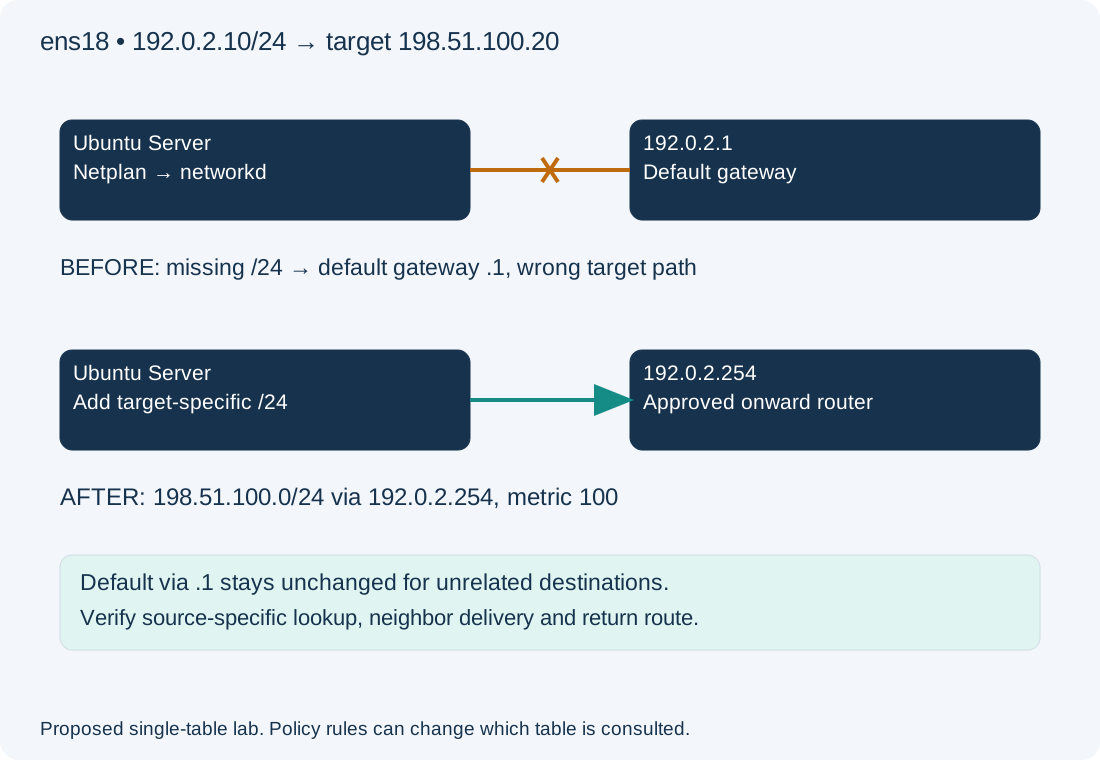
Inspect Netplan Renderer, Policy Rules and Kernel Route Lookup
On the Ubuntu host, diagnostic commands:
ip -br address
sudo netplan get
networkctl status ens18
ip -4 rule show
ip -4 route show table all
ip -4 route get 198.51.100.20 from 192.0.2.10
netplan get shows merged configuration and can expose private network details; sanitize it before sharing. Confirm the interface name exists and networkd actually manages it. In the lab fault, the final lookup selects via 192.0.2.1 dev ens18 src 192.0.2.10. That is expected illustrative interpretation, not captured output. If a rule chooses another table or a more-specific route exists, investigate that earlier decision instead of assuming the main table is authoritative.
| Check | What it establishes | Next step when wrong |
|---|---|---|
| Address and interface | Actual source and connected subnet | Resolve link/address ownership first |
| Merged Netplan and renderer | Intended effective backend configuration | Inspect all source files and provisioning ownership |
| Rule list and tables | Policy lookup order and available routes | Follow the matching source/table/priority |
| Route get with source | Kernel selection for this flow | Compare gateway, device and source with design |
Within a selected table, longest-prefix matching comes before comparing metrics among otherwise comparable routes. A /24 can beat a default route despite a numerically larger metric. A lower metric does not make a route in an unconsulted policy table win. Check whether the application uses another source address or network namespace when its behavior differs from this lookup.
Check Merged Netplan Files and Gateway Reachability
Inspect /etc/netplan/*.yaml and any relevant files under /run/netplan and /lib/netplan. Later lexical definitions and same-name file shadowing can change the merged result. In a cloud image, determine whether cloud-init or another provisioner will regenerate the file. Do not add a second renderer or edit generated backend files as a persistent fix. The Netplan YAML reference documents configuration ownership and route fields.
Check the intended gateway without changing the route:
ip -4 route get 192.0.2.254
ip neigh show dev ens18
ping -c 3 -I 192.0.2.10 192.0.2.254
Expected lab evidence is an on-link route to .254 through ens18 and, after traffic, an appropriate neighbor entry. A failed ping may reflect ICMP policy; correlate ARP/neighbor evidence and the router’s interface state. Do not add on-link: true to bypass an addressing mistake. The gateway must actually forward the target network and the remote side must return traffic to 192.0.2.10.
Add the Static Route to the Authoritative Netplan Configuration
Configuration change — lab only. Use a working out-of-band console, record the existing source files and route/rule state, and assess effects on remote management. The lab has a single locally owned file /etc/netplan/01-lab.yaml; back it up to a new unused backup filename before editing. This complete minimal lab model adds only the destination route; merge that stanza into a real host’s existing model rather than overwriting its DNS, VLANs or other interfaces.
network:
  version: 2
  renderer: networkd
  ethernets:
    ens18:
      dhcp4: false
      addresses: [192.0.2.10/24]
      routes:
        - to: default
          via: 192.0.2.1
        - to: 198.51.100.0/24
          via: 192.0.2.254
          metric: 100
Keep source permissions restrictive, then validate and use a guarded trial from the console:
sudo netplan generate
sudo netplan try --timeout 120
generate validates and writes backend configuration without activating it. try applies the proposal temporarily and asks for confirmation. Confirm only after verifying management access and the intended lookup. Automatic rollback has documented limitations; inspect live state after a timeout and restore the YAML source if needed. Do not assume unconfirmed YAML was removed from disk. See netplan try behavior.
Verify Ubuntu Forwarding, Return Routes and Persistent Rollback
Repeat ip route get with the same destination and source. The target is via 192.0.2.254 dev ens18 src 192.0.2.10 while an unrelated destination still uses .1. Then use an approved service request to 198.51.100.20 and correlate forwarding/return evidence on the router. ICMP failure alone cannot distinguish filtering from a missing return route. Record the real results; schedule any reboot/persistence test separately rather than rebooting a remote server to validate a route.
Rollback restores the backed-up authoritative YAML and uses netplan generate followed by another guarded netplan try from the console. Confirm the intended baseline and management access. Do not merely delete a kernel route while leaving persistent YAML that will reintroduce it later. The restored baseline can reproduce the known target failure. For a container-specific path, use Docker publishing; for routing-adjacency failure, the OSPF EXSTART guide owns a different fault boundary.