
An Ubuntu VM can reach an address but cannot resolve a hostname. That narrows the investigation, but it does not prove the DNS server itself is broken. Resolver selection, search domains, routing to the resolver and the application lookup path all need consideration.
Lab status: This is a proposed exercise, not a completed device test or client case study. Code examples require validation against your image and dependency versions. My documented background is NOC/data center operations, multi-vendor Netmiko workflows and Python/Flask integration.
Offline example checks: October 20, 2026: the added helper/demo block executed with local fixtures, and related negative cases were checked offline. No live device, controller, fabric or service behavior was validated.
What does IP reachability establish about a DNS failure?
A successful ping demonstrates one form of reachability for the tested destination. DNS may use another destination and transport, and an application may need more than name resolution. Start with the exact fully qualified name and the operation that fails.
Compare three paths: getent ahosts host.example.test tests the OS lookup path, resolvectl query host.example.test inspects systemd-resolved behavior, and dig @192.0.2.53 host.example.test A queries one approved resolver directly. dig needs the DNS diagnostic package. A direct positive answer with a failed OS lookup points toward resolver selection, NSS or local state rather than a missing authoritative record.
How can resolver selection send queries to the wrong DNS server?
Check resolvectl status for per-link DNS and domain routing, then ip route get 192.0.2.53 for the resolver path. A search suffix problem affects a short name differently from its FQDN. Do not replace a corporate resolver with public DNS when the required zone is private.
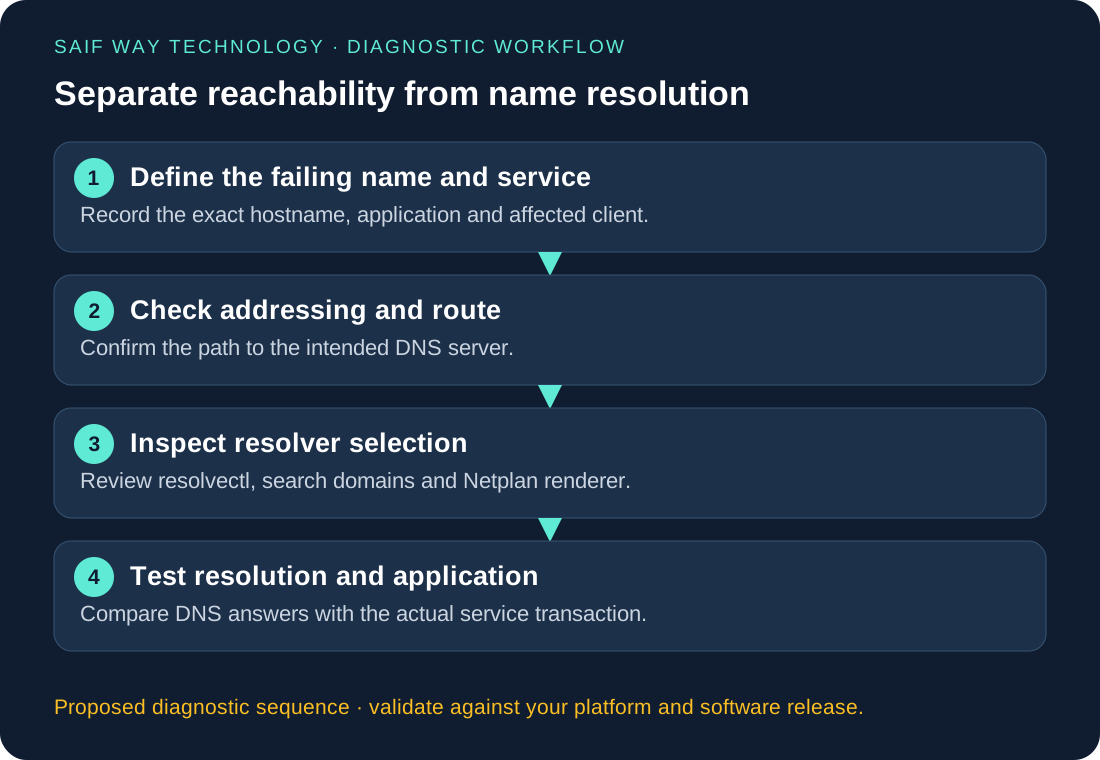
Proposed Ubuntu lab: separate IP connectivity from name lookup
Use Ubuntu Server 24.04 with the networkd renderer as a proposed baseline only after confirming that is the VM’s active setup. Record /etc/resolv.conf ownership/symlink, networkctl status and all applicable Netplan files. One changed variable per test separates a bad server address, a missing record and a wrong search suffix.
Python: test the system resolver lookup path
The additional wrapper lets local tests inject resolver answers without sending DNS packets. The real default uses getaddrinfo, which follows the OS resolver and can block beyond a simple socket timeout. Run it in a worker with a job deadline if integrating into a service; it does not test application TLS or a chosen DNS transport.
import socket

host = 'host.example.test'
try:
    answers = socket.getaddrinfo(host, 443, type=socket.SOCK_STREAM)
    print(sorted({item[4][0] for item in answers}))
except socket.gaierror as exc:
    print({'status': 'resolution_failed', 'error_code': exc.errno})
Worked Python example and input contract
import socket

def resolver_check(host, resolver=socket.getaddrinfo):
    try:
        answers = resolver(host, 443, type=socket.SOCK_STREAM)
        addresses = sorted({r[4][0] for r in answers})
        return {'state': 'resolved' if addresses else 'empty_result', 'addresses': addresses}
    except socket.gaierror as exc:
        return {'state': 'resolver_failure', 'error_code': exc.errno, 'addresses': []}

def fake_lookup(*args, **kwargs):
    return [(None, None, None, None, ('192.0.2.10', 443))]
print(resolver_check('host.example.test', resolver=fake_lookup))  # No DNS query
# resolver_check('host.example.test') uses the real OS resolver when called.
How should Netplan and resolver changes be made persistent?
For this proposed networkd lab, merge the following into the existing configuration for the actual interface; do not replace the entire file or overwrite routing/address settings. The address is documentation space and must be replaced with your lab resolver.
network:
  version: 2
  renderer: networkd
  ethernets:
    ens3:
      nameservers:
        addresses: [192.0.2.53]
        search: [example.test]
      dhcp4-overrides:
        use-dns: false
dhcp4-overrides applies when DHCPv4 is actually enabled on that interface. Review IPv6 and other links separately. Back up the existing files, use console access, run sudo netplan generate, then sudo netplan try --timeout 120. Verify rollback if confirmation is missed; do not assume every change is reverted automatically. Recheck after reconnecting and rebooting the disposable VM.
What should a DNS diagnostic report record?
Report requested FQDN, selected resolver/link, OS lookup outcome and a separate application test. Preserve timestamps and known cache effects. An NXDOMAIN response, timeout and stale data need different next steps; the Python error alone may not provide enough detail to choose one.
Related troubleshooting and implementation
Explore the network automation troubleshooting collection to connect this issue to adjacent workflows. The Netmiko, NETCONF and RESTCONF comparison helps when you are choosing an interface rather than fixing an existing implementation.