A published port is a forwarding intention, not proof that an application accepts traffic at the container address. If the application listens only on its own loopback interface, a correct host-to-container mapping still cannot reach it. Check the listener, mapping and client path independently before changing firewall rules.
Scope and evidence: Proposed Linux Docker Engine bridge-network lab using Compose v2 and IPv4 NAT publishing. Host 192.0.2.10 publishes TCP 8080 to container TCP 8000; authorized client 192.0.2.20 tests it. The app is Python’s disposable HTTP server, not a production web stack. No live container output or successful test is claimed. Rootless Engine, Docker Desktop, host networking, Swarm ingress and routed bridge modes need their corresponding path analysis.
Distinguish Docker Host Loopback from Container Loopback
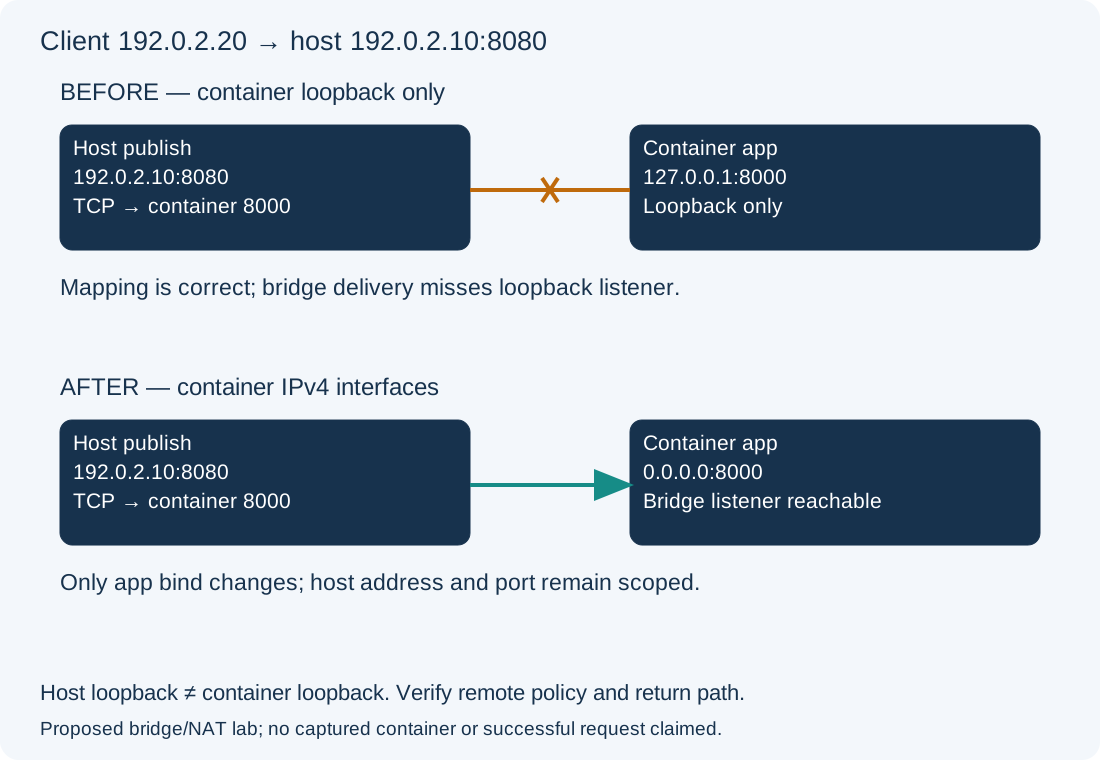
Host 127.0.0.1 and container 127.0.0.1 belong to different network namespaces. Publishing only to host loopback restricts remote access by design; binding the application to container loopback prevents the normal published path from reaching it. These are different faults. Here the host mapping is already the approved 192.0.2.10:8080:8000; the injected fault is the application’s --bind 127.0.0.1 inside the container.
Check Docker Published Ports and the Application Listener
On the Docker host, diagnostic commands for the existing Compose project:
docker version
docker compose ps
docker compose port web 8000
docker compose logs --tail 30 web
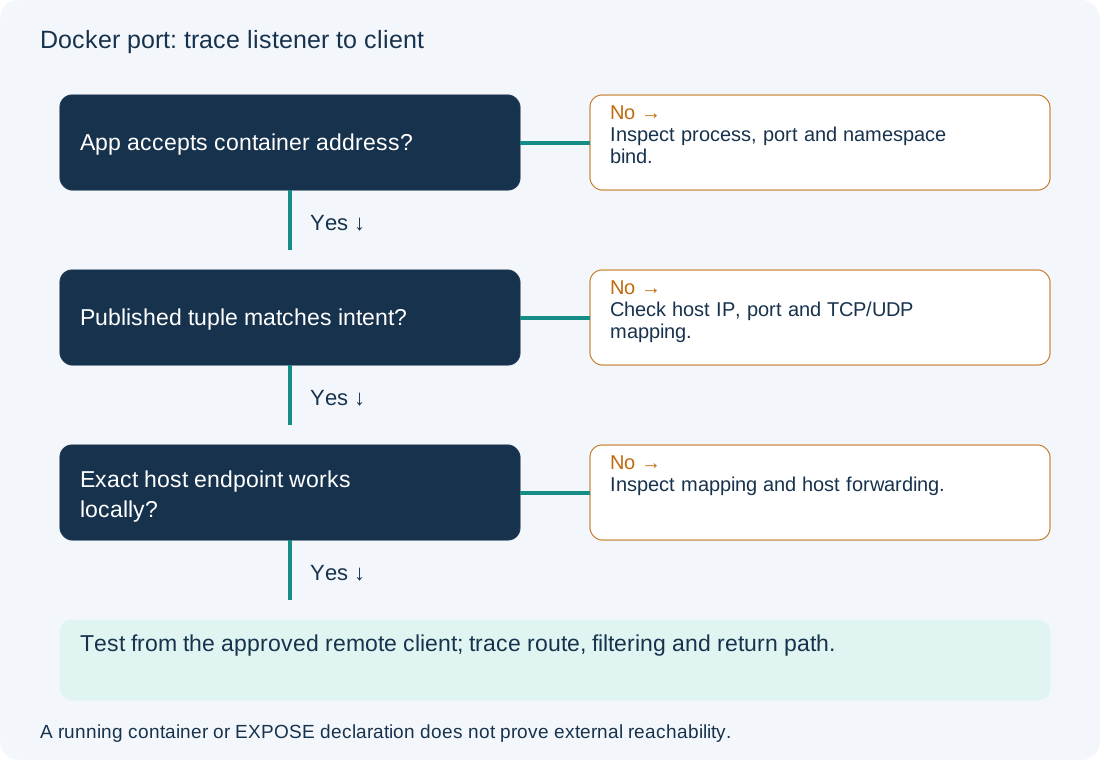
Expected lab evidence is a running web service and a published address 192.0.2.10:8080. Running is not an application health result. Inspect the service’s approved command/configuration to confirm its listen port and bind address; logs can contain sensitive request information. EXPOSE image metadata or Compose expose does not create a published host mapping. Docker’s port-publishing reference describes the address and port translation.
For this Python image, these in-container TCP probes distinguish loopback from the bridge address without installing tools:
docker compose exec web python -c "import socket; s=socket.create_connection(('127.0.0.1',8000),2); print(s.getpeername()); s.close()"
docker compose exec web python -c "import socket; a=socket.gethostbyname(socket.gethostname()); print(a); s=socket.create_connection((a,8000),2); print(s.getpeername()); s.close()"
The first should connect in the fault state; the second should fail because no listener accepts the bridge address. Record actual errors rather than interpreting every timeout as proof of loopback binding. This probe assumes the default container hostname resolves to its assigned bridge address and Python is present. On another image, use its supported listener diagnostics or an authorized namespace inspection tool. Do not modify a production image just to add debugging packages.
| Observation | Candidate boundary | Next action |
|---|---|---|
| Neither container probe works | Process, port or startup failure | Inspect app configuration and bounded logs |
| Loopback works; bridge-address probe fails | Container listener or namespace policy | Confirm bind address and container filtering |
| Container address works; host mapping fails | Publish tuple or host forwarding path | Check host IP, port/protocol and Docker rules |
| Host mapping works locally; remote fails | Client route, host bind or external policy | Trace the actual remote path and return traffic |
Test the Same Published Endpoint from Host and Remote Client
Run the same bounded request on the host and authorized external client:
curl --connect-timeout 3 --max-time 5 http://192.0.2.10:8080/
Expected fault-state evidence is failure to retrieve the lab page. A test to host 127.0.0.1:8080 would not test this specifically bound mapping. A local success also does not prove the external route or policy. If the container listener is correct, inspect the actual configured iptables/nftables backend and source/destination observations; do not flush Docker-managed rules or disable forwarding isolation. Docker publishing interacts with host filtering, including UFW, so a UFW rule alone is not a complete exposure model. Follow Docker’s firewall integration guidance.
Correct the Container Application Bind in Docker Compose
Configuration change — disposable lab. Preserve the existing Compose file and review the application exposure before recreating this service. The following is a complete minimal corrected lab file; the prior version is identical except that the command ends with 127.0.0.1. It assumes 192.0.2.10 is assigned to the host. A real production application needs its approved server, authentication, content and deployment process.
services:
  web:
    image: python:3.12-slim
    command: ["python", "-m", "http.server", "8000", "--bind", "0.0.0.0"]
    ports:
      - "192.0.2.10:8080:8000"
Binding 0.0.0.0 here means all IPv4 interfaces in the container, not all addresses on the host. Review other containers’ access on that bridge as well as the published external path. Use an approved pinned image digest for repeatable operational deployments. From the project directory:
docker compose config --quiet
docker compose up -d --no-deps --force-recreate web
The first validates the Compose model; the second can pull an image and interrupts/recreates this service. Check persistence and open sessions first. No daemon-wide restart or firewall change is needed for this demonstrated bind fault. Compose service semantics are documented in the service reference.
Verify Docker Port Reachability and Restore the Original Bind
Repeat both container probes and the exact host/client request. The intended result is a reachable bridge listener and the lab HTTP response through 192.0.2.10:8080, with only the approved external sources permitted by the deployment’s policy. Check that no unintended host address/protocol mapping was introduced. A page response does not validate authentication, TLS or production readiness.
Rollback restores the saved Compose command’s --bind 127.0.0.1, then runs the same validation and service recreation. That intentionally restores the known inaccessible external path; coordinate service interruption. If only host-local access was intended, keep the app reachable inside the container and use a deliberately loopback-bound host publication instead, after reviewing the Engine version and isolation requirements. For name failures rather than a numeric-port path, see Docker DNS; for route selection, see the Ubuntu route guide.