
Two routers can exchange small pings while an OSPF neighbor stays in EXSTART or EXCHANGE. That is enough to investigate database exchange, but not enough to declare an MTU mismatch. Compare both routers’ operational IP MTUs, configuration and packet evidence before changing an interface or bypassing an OSPF check.
Scope and evidence: This is a hypothetical two-router lab, not a captured incident. Commands use Cisco IOS XE syntax, with Catalyst 8000V on IOS XE 17.12 as the proposed lab platform. Validate command support on your exact image. No live router or measured outcome is claimed. Diagnostic commands are read-only unless explicitly marked otherwise.
OSPF EXSTART Symptoms and the MTU Mismatch Lab
R1 GigabitEthernet1 is 192.0.2.1/30; R2 GigabitEthernet1 is 192.0.2.2/30. Both participate in OSPF area 0 with point-to-point network type. R1 Loopback0 is 198.51.100.1/32; R2 Loopback0 is 203.0.113.2/32. The loopbacks are also advertised in area 0 and provide independent route-verification targets.
Both Ethernet interfaces have a 1500-byte link MTU. R1’s IP MTU is 1500; R2 has an unintended ip mtu 1400 override. This difference matters: a link MTU line from show interfaces is not a substitute for inspecting the effective IP MTU. The intended design supports 1500 end to end, without tunnels or reduced-MTU transport.
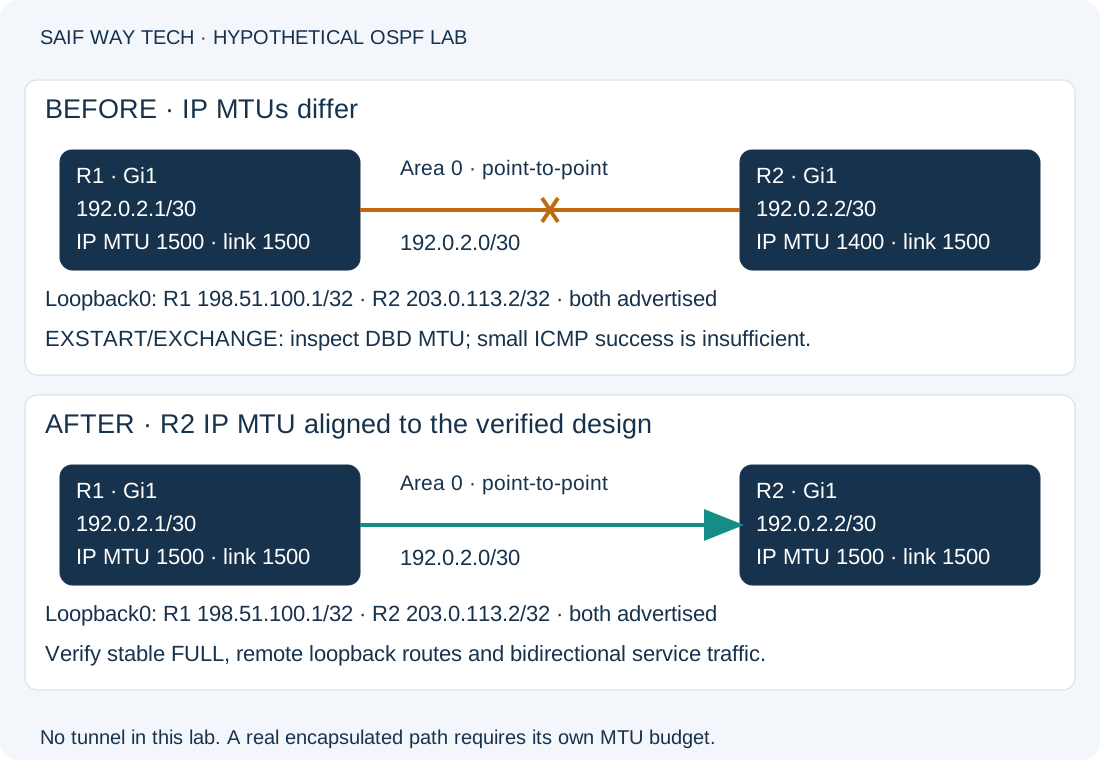
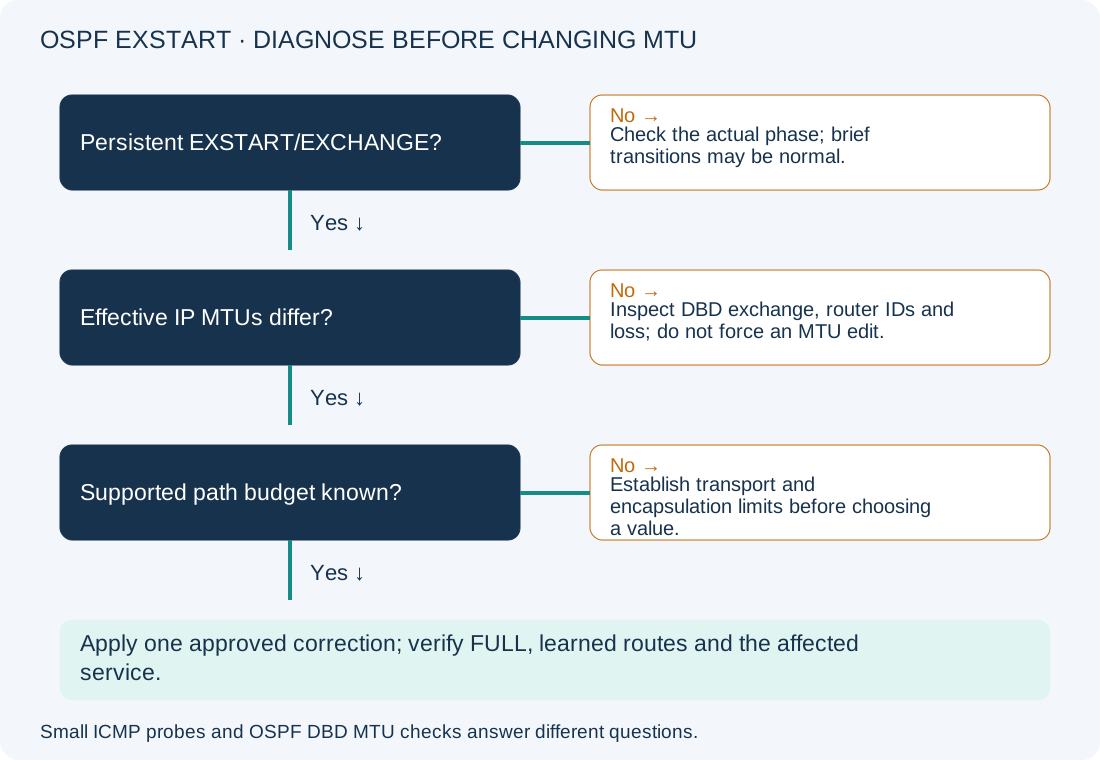
Brief transitions through these states are normal. Record whether the neighbor remains stuck across repeated samples. A missing neighbor, persistent INIT, or expected 2-WAY relationship on a broadcast segment belongs to a different diagnostic branch. The expected steady state for this two-router point-to-point lab is FULL, rather than a DR/BDR relationship.
Identify the OSPF Neighbor State and DBD Failure
On both routers, use privileged EXEC for these read-only checks:
show ip ospf neighbor
show ip ospf interface gigabitEthernet1
show interfaces gigabitEthernet1
show ip interface gigabitEthernet1
show running-config interface gigabitEthernet1
show logging
| Command | Healthy evidence for this lab | Abnormal evidence and next action |
|---|---|---|
show ip ospf neighbor |
Intended peer progresses to FULL and remains stable | Repeated EXSTART/EXCHANGE: compare database-exchange prerequisites. No peer/INIT: inspect hello reachability and one-way communication first. |
show ip ospf interface |
Area 0, point-to-point type, expected timers and local address | Different area, network type or timers: reconcile against design; do not assume MTU is the only mismatch. |
show interfaces |
Interface up/up, link MTU 1500, stable error counters | Down/flapping or growing physical errors: resolve media/interface health before protocol tuning. |
show ip interface |
Effective IP MTU 1500 at both ends | R2 reports 1400 while R1 reports 1500: inspect the override and transport design. |
show running-config interface |
Intended address and OSPF settings; compatible IP MTU | Unexpected ip mtu, network-type or authentication settings: record both sides and identify the owner before editing. |
show logging |
No repeated adjacency resets during the sample window | Correlate reset reasons and timestamps with interface events. A missing MTU log does not exclude a mismatch. |
Router process IDs are locally significant and need not match across peers. In this lab, area, subnet and intended neighbor identity must agree. Save sanitized output from both ends; a single router’s configuration cannot establish a two-sided mismatch.
Compare OSPF Interface MTU Checks with Path MTU
OSPF database-description packets carry an interface MTU field. A peer can reject an advertised MTU that exceeds its receiving interface’s IP MTU; the packet need not itself be oversized. This is why a successful small ping does not settle the OSPF question. Cisco’s EXSTART/EXCHANGE reference describes this behavior and notes that MTU mismatch is not the only cause of a stuck exchange.
Use these limited probes on R1, then run equivalent probes from R2 toward 192.0.2.1. They generate traffic but do not change configuration. ICMP must be allowed for the result to be useful.
ping 192.0.2.2 repeat 5
ping 192.0.2.2 size 1500 df-bit repeat 5
The first tests basic ICMP reachability to the directly connected peer. Success does not prove OSPF protocol 89 is passing. Failure directs you to addressing, Layer 2 transport or policy checks. The second asks IOS XE for a 1500-byte IP echo with fragmentation disallowed. IOS size semantics differ from a Windows/Linux ping payload size; do not transplant the number between tools without accounting for headers.
A successful larger probe is evidence for that source, direction and ICMP flow, not proof that the OSPF database-description MTU check passes. A failure can mean local IP MTU, path capacity, filtering or ICMP handling; compare both directions and smaller sizes before assigning a cause. Even an interface IP MTU mismatch need not produce identical inbound and outbound ping behavior on every platform.
If the configurations do not explain the state, take an approved, short packet capture on the lab link. Inspect OSPF database-description MTU fields, sequence progression, retransmissions and router IDs on both sides. A capture is additional operational work with resource/privacy considerations; do not enable unrestricted production debugging as a first step.
Correct the Confirmed OSPF Lab IP MTU Override
Configuration-changing; authorized maintenance and privileged access required. Proceed only when both outputs establish the stated mismatch and the actual transport supports 1500. Record R2’s original stanza, routes and management path. Have console/out-of-band access and a rollback plan: changing MTU can disturb OSPF and applications using the link.
On R2 only:
configure terminal
interface gigabitEthernet1
ip mtu 1500
end
This aligns the effective IP MTU with the intended lab design without changing the underlying Ethernet MTU. A tunnel, WAN service or encapsulated link with a smaller real budget needs a different design decision; do not raise it blindly. Avoid treating ip ospf mtu-ignore as a general repair: it bypasses a protocol check without proving the path can carry required traffic. No OSPF process reset is included here.
For this exact fault-injection baseline, rollback on R2 is:
configure terminal
interface gigabitEthernet1
ip mtu 1400
end
That restores the lab fault, not a working production service. In a real change, restore the approved prior working state or alternate path, and verify it separately.
Verify OSPF Adjacency, Learned Routes and Service Traffic
Repeat the neighbor and IP interface checks on both ends. Expect IP MTU 1500 at each end and stable FULL adjacency. If exchange still stalls, stop repeating the configuration change and inspect router IDs, database exchange and packet loss.
These additional read-only commands run on R1:
show ip route ospf
show ip route 203.0.113.2
ping 203.0.113.2 source 198.51.100.1 repeat 5
The first lists OSPF-learned routes; expect the remote advertised loopback. The second checks the actual selected route to R2’s loopback; an unexpected static/default route or absence of the /32 needs route-advertisement/selection investigation even if adjacency is FULL. The sourced ping tests forward and return reachability between advertised loopbacks. It should succeed if the intended routes and ICMP policy allow it; failure calls for a return-route and policy check. Repeat symmetrically from R2 and test the original application. FULL adjacency alone is not service verification.
Persist accepted configuration with copy running-config startup-config only after review; that command writes startup configuration. Monitor adjacency stability and error-counter deltas over an agreed observation period.
Prevent OSPF MTU Mismatches and Find Related Guides
Include both link and IP MTU in pre/post-change evidence, especially across tunnels and provider handoffs. Keep one documented MTU budget per path and compare both ends before changing a routing protocol. The existing hybrid data-center network article covers the broader route/failover context; the NOC troubleshooting workflow helps separate scope from assumptions.
Cisco OSPF MTU Troubleshooting References
- Cisco: OSPF neighbors stuck in EXSTART/EXCHANGE.
- Cisco: troubleshoot OSPF neighbor problems.
- Cisco: BGP path MTU troubleshooting, for IOS DF probe examples and the distinction between interface settings and path limits; BGP-specific corrections are not applied here.