The Linux host resolves an application name, but a Docker container on the same machine reports a name-resolution error. Host success proves only the host lookup path. The container can have a different namespace, resolver configuration and upstream DNS selection, even when both use the same physical connection.
Scope and evidence: Hypothetical rootful Docker Engine on Ubuntu 24.04, a user-defined bridge and the Docker Compose plugin. This is not Docker Desktop, rootless Docker, Swarm or Kubernetes guidance. No real container, DNS reply or application outcome was tested. Example addresses and .test names are reserved for documentation/lab use. Record the installed Engine/Compose versions and approved image digest before reproducing the scenario.
Docker DNS Failure When Host Resolution Works
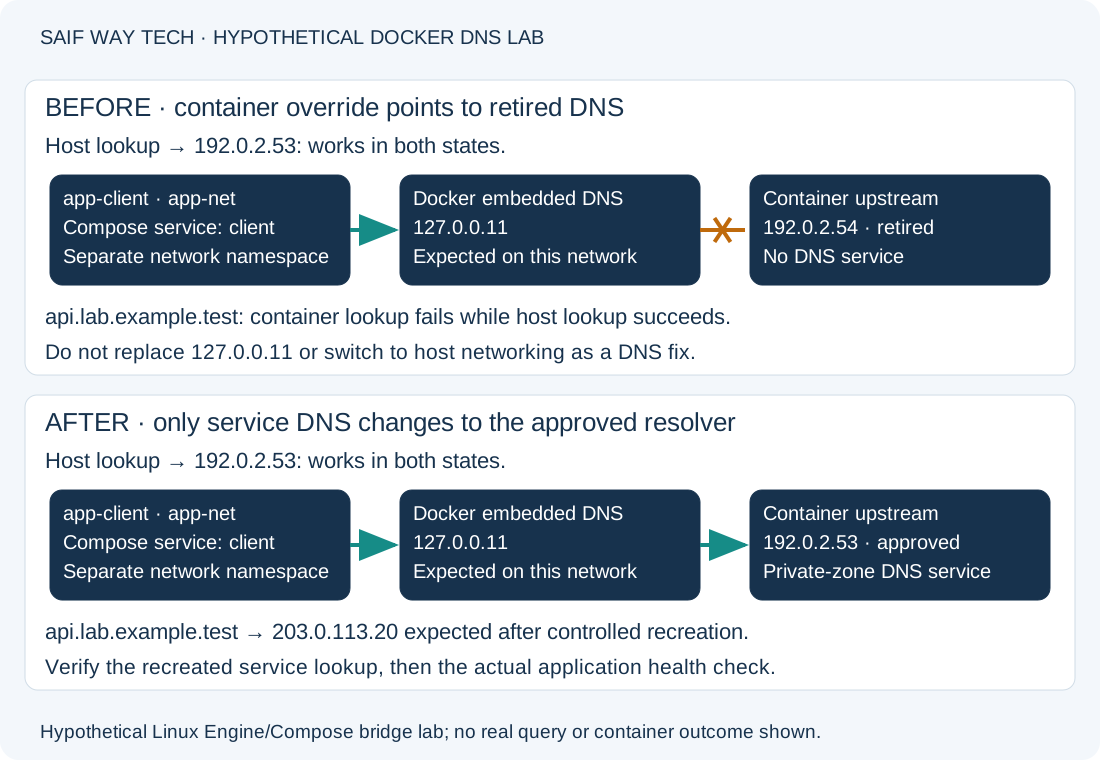
The host resolves api.lab.example.test through an approved resolver at 192.0.2.53, which returns lab application address 203.0.113.20. Compose service client, container app-client, is already running on user-defined bridge app-net. The lab image is a locally approved/preloaded python:3.12-slim image with Python available. Its long-running process keeps the disposable diagnostic container alive.
The fault is a service-level DNS override pointing to retired resolver 192.0.2.54, where no DNS service is available. The bridge and host route to the approved resolver otherwise work. The exact image tag is not an immutable artifact: record/use the approved digest in the real project. The commands below prevent implicit image pulls where a new container is used.
Check the Host DNS Resolver and Successful Lookup
On the Ubuntu host, these commands inspect resolution and active resolver configuration. They normally do not need elevation; lookup commands generate DNS traffic as needed.
getent ahostsv4 api.lab.example.test
resolvectl status
docker version
docker compose version
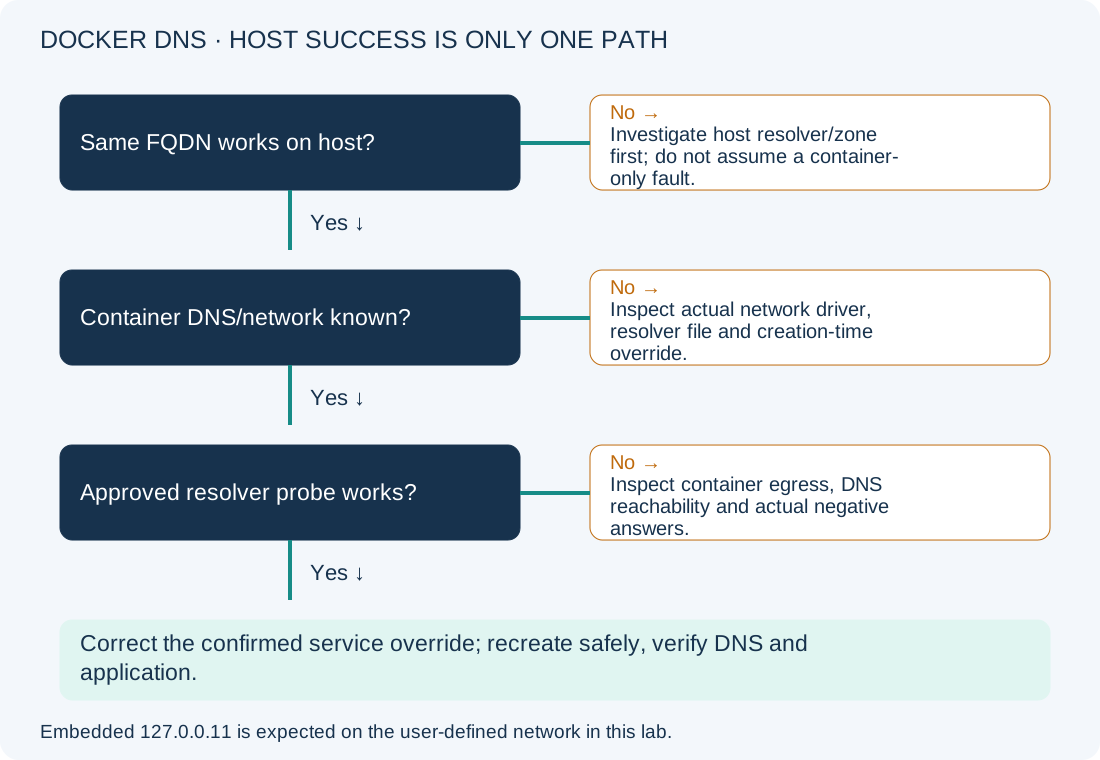
The host lookup should include 203.0.113.20 for this lab. getent follows the host’s NSS lookup path and can also use /etc/hosts; success alone does not prove a DNS server answered. A different answer, cached state or a short-name-only success needs host/zone investigation first. resolvectl status helps identify the host’s per-link DNS/domain routing when systemd-resolved owns that path; it does not describe every application resolver or a container’s forwarding configuration. The version commands record which Docker/Compose behavior applies; Docker access requires an authorized account, and membership of the Docker socket group is highly privileged.
If the host lookup fails too, start with the existing Ubuntu DNS guide. This article’s distinct case is host success alongside a container-specific failure.
Inspect Container resolv.conf, DNS Overrides and Network Mode
These commands do not change Docker configuration. docker exec starts a short diagnostic process inside the existing lab container; the lookup can generate traffic.
docker exec app-client cat /etc/resolv.conf
docker exec app-client python -c "import socket; print(socket.getaddrinfo('api.lab.example.test', 443, type=socket.SOCK_STREAM))"
For a container on this user-defined bridge, nameserver 127.0.0.11 is expected: Docker provides embedded DNS there. It is not the same as setting --dns 127.0.0.1, which refers to the container’s own loopback. Containers on the default bridge and user-defined networks do not have identical DNS/name-discovery behavior; confirm the network before applying advice from another setup. Docker documents these DNS paths.
Python’s getaddrinfo tests the lookup path used by the Python process. In the faulty lab it raises a resolution error; a successful result should include the intended application address. Passing SOCK_STREAM describes the requested socket type; this call does not connect to port 443 or validate TLS.
Inspect the override and network using narrow fields rather than dumping environment variables or secrets:
docker inspect --format '{{json .HostConfig.Dns}}' app-client
docker inspect --format '{{json .NetworkSettings.Networks}}' app-client
docker network inspect --format '{{.Driver}}' app-net
| Check | Healthy evidence for this lab | Abnormal result and next action |
|---|---|---|
| DNS override | Approved 192.0.2.53 after correction |
Faulty 192.0.2.54 points to a retired service. An empty override list means inspect inherited defaults; it does not mean no DNS exists. |
| Network attachment | Container attached to app-net |
Wrong/missing network: review service/network ownership before resolver changes. |
| Network driver | bridge for this example |
Different driver, host mode or shared namespace: follow that model rather than assuming this topology. |
| Container lookup | Intended address returned | Timeout/temporary failure: inspect resolver reachability/selection. NXDOMAIN: inspect the queried zone/name; a negative answer is different from no response. |
Do not edit the generated /etc/resolv.conf as the persistent fix or assume a daemon restart is required. Identify the service-level configuration that created the override. An internal .test zone also will not be repaired by substituting an unrelated public resolver.
Compare a Controlled DNS Query Inside the Container
Use a locally approved image already present on the host. The following creates and automatically removes a temporary diagnostic container on the same lab network. It changes no existing service, but still requires Docker authorization and consumes resources:
docker run --rm --pull=never --network app-net --dns 192.0.2.53 python:3.12-slim python -c "import socket; print(socket.getaddrinfo('api.lab.example.test', 443, type=socket.SOCK_STREAM))"
Expect the intended address if the approved resolver is reachable from that network. A local image-not-found error means the controlled probe never ran; do not confuse it with DNS failure. Success supports a per-container override problem when the original container still fails and inspection shows the retired resolver. It is not proof of every production container’s security rules, runtime or application behavior.
If both containers fail, inspect host forwarding/firewall policy, the actual DNS service and UDP/TCP 53 paths. Host-originated DNS and bridged container egress can encounter different rules. Do not flush host firewall rules, switch to host networking or disable isolation as a DNS repair.
Correct the Confirmed Compose Service DNS Override
Configuration/lifecycle-changing; approved maintenance required. In this lab the existing Compose service is named client and already defines its image, command, network, volumes and other settings. Record the original service configuration and data/rollback plan. Recreating a container interrupts that service; data in its writable layer is not a safe persistence strategy. Do not replace a real Compose file with this fragment.
Merge this DNS-only fragment into that existing service, replacing the retired resolver entry:
services:
  client:
    dns:
      - 192.0.2.53
From the correct lab project directory, validate and apply the reviewed change:
docker compose config --quiet
docker compose up -d --no-deps --pull never client
The first validates the Compose configuration without printing the expanded configuration, which might contain sensitive values. Validation failure means stop and fix the file. The second starts/recreates the changed service as needed, without starting dependencies or pulling an image. Confirm the correct project/overrides and running container identity; app-client must be the lab’s configured container name. This is not a daemon-wide DNS change.
Rollback restores the recorded service DNS configuration and reapplies the same reviewed service operation. For the stated fault-injection lab, that would restore 192.0.2.54 and the failure; production recovery must instead restore an approved working configuration and required data state. A simple restart does not necessarily apply a changed container creation-time DNS setting.
Verify Container DNS Resolution and Application Connectivity
Repeat the narrow DNS inspection, resolver-file read and lookup in the recreated service. Expect the approved override, the normal embedded resolver for the user-defined network and the intended answer. Verify the real application using its approved health check.
For this lab, an additional limited TCP check can separate name resolution from a reachable listener:
docker exec app-client python -c "import socket; c=socket.create_connection(('api.lab.example.test',443),timeout=5); print(c.getpeername()); c.close()"
An intended peer address with a successful connection checks DNS plus TCP reachability. A refused connection or timeout after successful DNS leads to listener/path investigation. This does not validate certificate trust, HTTP status or application authorization. The certificate guide covers a related dependency; do not disable TLS checks to make the DNS investigation appear complete.
Prevent Docker DNS Override Errors and Review References
Keep private-zone resolver requirements in the service deployment record and remove retired per-container overrides during resolver migrations. Check both host and container paths, then rerun the service health check after controlled recreation. Preserve the distinction between external FQDN lookup and automatic container/service-name discovery on a user-defined network.