
A VLAN number in the allowed list is permission to use a trunk, not proof that frames are forwarding. On Catalyst IOS XE, the operational trunk output separates the configured allowance from active VLANs and the forwarding/not-pruned set. Read all three sections on both peers before adding more VLAN permissions or disabling STP.
Scope and evidence: Hypothetical Catalyst 9300 IOS XE 17.15 lab, Rapid PVST+, standalone Gi1/0/48 trunks and VTP transparent mode with local VLAN ownership. This is not NX-OS or an automated fabric/controller procedure. No captured output or live forwarding result is claimed. Read-only checks precede the explicitly marked local VLAN database change.
VLAN Allowed but Not Forwarding: Missing Local VLAN Example
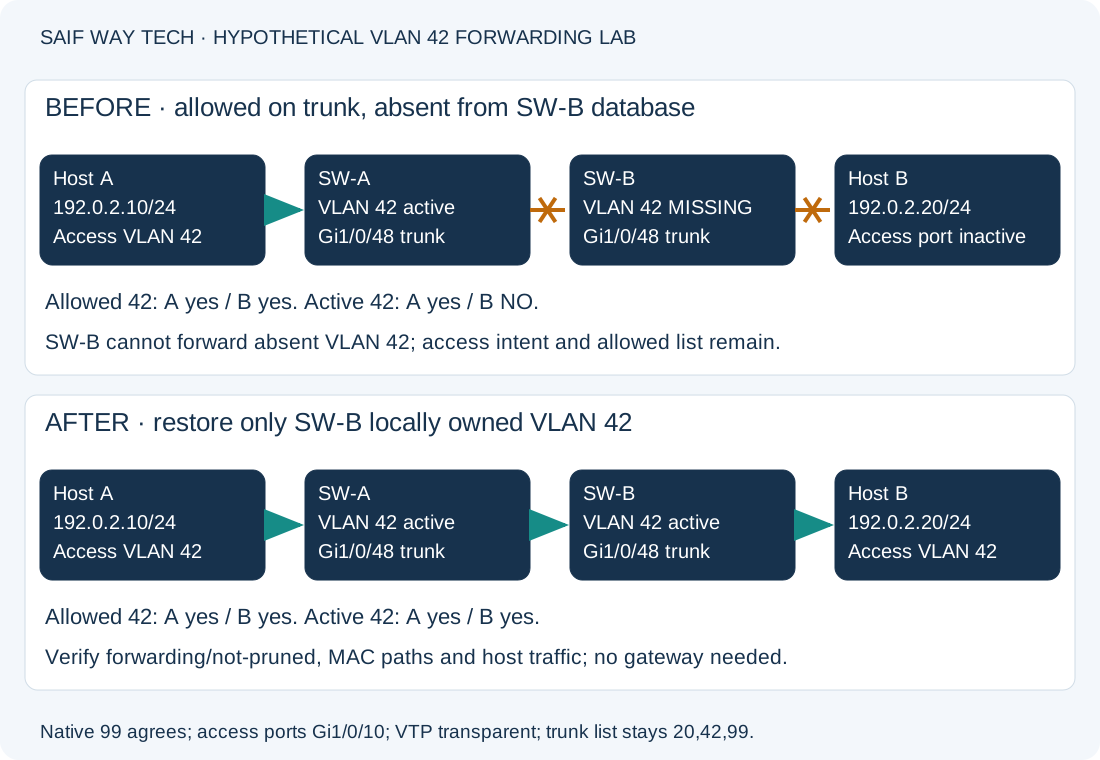
SW-A Gi1/0/48 connects to SW-B Gi1/0/48. Both trunks already allow 20,42,99; native VLAN 99 agrees and is active. SW-A has active VLAN 42. SW-B lost VLAN 42 from its local VLAN database after its access-port assignment and trunk configuration were established. Those interface intentions remain, but SW-B’s VLAN 42 access port can be inactive while the VLAN is absent.
Host A on SW-A Gi1/0/10 is 192.0.2.10/24; Host B on SW-B Gi1/0/10 is 192.0.2.20/24. Both access ports are intended for VLAN 42. They test same-subnet forwarding; no gateway or SVI is needed for this specific path. This distinguishes the article from the earlier missing-allowed-VLAN gateway guide.
Read Allowed, Active and Forwarding VLAN Trunk Lists
On both switches, run this read-only privileged EXEC command:
show interfaces trunk
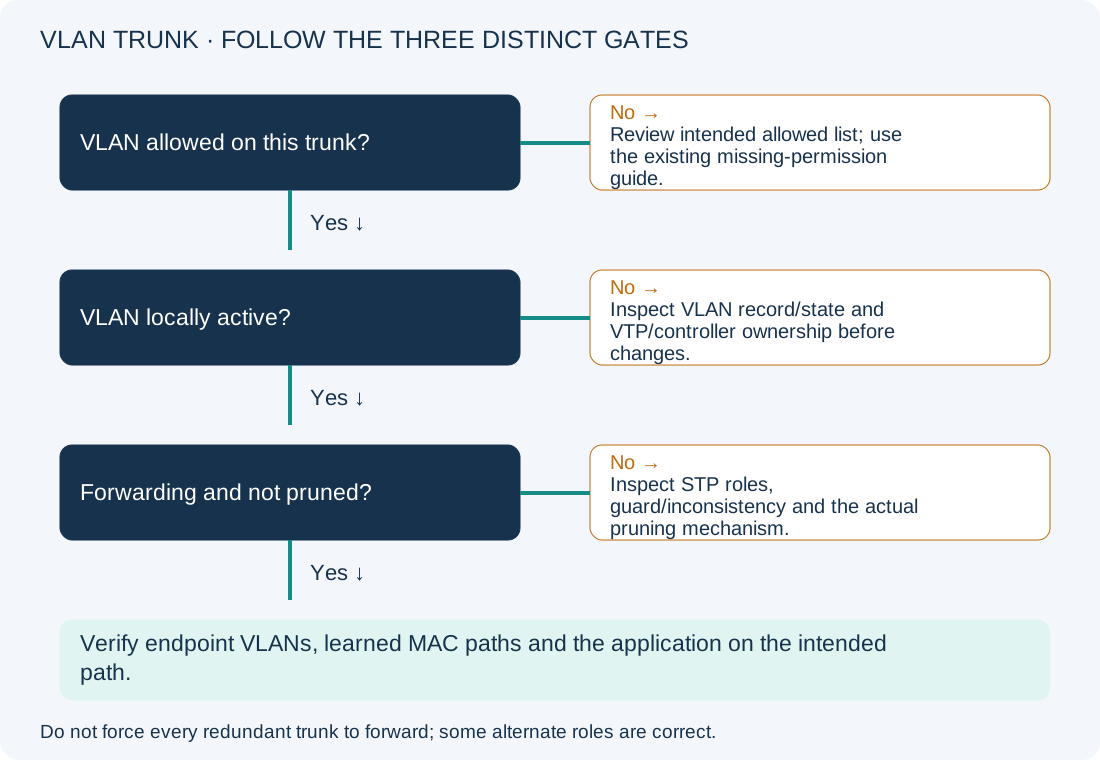
First confirm that the intended interface is actually listed as trunking. Then follow VLAN 42 through the three sections:
| Trunk output section | What it means | What absence of VLAN 42 suggests |
|---|---|---|
| VLANs allowed on trunk | Administrative allowance for that trunk | A missing permission; investigate the allowed list through the gateway/trunk guide, rather than this lab’s database correction. |
| VLANs allowed and active in management domain | Allowed VLANs that are locally active in the VLAN database | Missing/suspended/inactive VLAN state or management ownership needs investigation. The phrase does not mean only a special management VLAN. |
| VLANs in spanning tree forwarding state and not pruned | The active eligible set currently forwarding/not pruned on that link | If present in the first two sections but absent here, inspect STP role, inconsistency and pruning. Do not infer which one from this line alone. |
The output is local evidence. Seeing 42 in all three sections on SW-A does not prove SW-B has the VLAN or that the endpoint is in it. In this lab, SW-B has 42 in the first section and not in the second; that is the earliest failed gate. STP cannot forward an absent local VLAN merely because the trunk permits its number.
Check Local VLAN State, VTP Ownership and Access-Port Intent
Use these read-only commands on SW-B, and compare the corresponding SW-A baseline:
show vlan id 42
show vtp status
show interfaces gigabitEthernet1/0/10 switchport
show interfaces status
show running-config interface gigabitEthernet1/0/48
show etherchannel summary
show vlan id 42 should show an active VLAN in a healthy configuration; a missing-VLAN indication supports this lab fault. A suspended or otherwise inactive existing VLAN is a different case and should not be treated as a missing record. show vtp status should confirm the documented transparent/local ownership in this lab. In a VTP-client or controller-managed environment, work through the authorized VLAN source instead of changing modes to permit a local edit.
The access switchport check should retain VLAN 42 as its intended assignment. show interfaces status can expose the inactive access port caused by the absent VLAN, while the trunk itself remains up. A wrong access VLAN, disconnected endpoint or err-disabled port needs its own correction. The trunk stanza should still permit 20,42,99; no replacement allowed list is required.
EtherChannel summary confirms whether the displayed trunk is actually a logical bundle. This example is standalone. If it is Port-channel10 in your environment, compare logical settings and bundled members through the LACP guide before treating one physical member as the whole path.
Distinguish Normal STP Blocking from VLAN Path Failure
If VLAN 42 is active but absent from the final trunk section, these read-only checks help identify the next branch:
show spanning-tree vlan 42
show spanning-tree inconsistentports
show logging
The per-VLAN output identifies the intended root, roles and forwarding state. In a redundant topology, an alternate/discarding port can be correct while another path carries the VLAN. An inconsistency/guard state needs its specific cause investigated; it is not solved by forcing every uplink into forwarding. Compare current events and configuration with the documented topology.
In this lab, SW-B may report no VLAN 42 spanning-tree instance while the VLAN is absent. That is not evidence of a new STP defect. After local VLAN restoration, the intended single trunk should become forwarding if no other fault exists.
When STP is forwarding but pruning is suspected, inspect the actual VLAN-management/pruning mechanism and peer demand/configuration on the installed platform. Do not assume VTP pruning applies to this transparent-mode lab, confuse a pruning-eligibility list with the allowed list, or remove pruning globally without proving the cause. For a native/PVID inconsistency, use the native VLAN guide.
Restore the Confirmed Missing Local VLAN
Configuration-changing, SW-B only. Confirm that VLAN 42 is absent, is intended on this switch, and is locally owned in the recorded transparent-mode lab. Record the VLAN/interface baseline and use console/out-of-band access. Creating a VLAN can activate pre-existing access ports and extend a broadcast/security domain; inspect all references and the intended segmentation before proceeding.
configure terminal
vlan 42
name LAB-APP42
end
This recreates the missing VLAN with its lab name. It does not change the trunk allowed list, native VLAN, port assignment or STP configuration. It is not the correction for an already-active VLAN being blocked on an intentionally redundant path.
For the exact fault-injection baseline, rollback would remove the newly created VLAN:
configure terminal
no vlan 42
end
That deliberately restores the lab outage and can inactivate all access ports relying on VLAN 42. Never delete a production VLAN merely to demonstrate rollback; use the approved prior working-state recovery plan and assess all attached services first. Do not delete vlan.dat or reset VTP as a broad troubleshooting action.
Verify Trunk VLAN Forwarding, MAC Learning and Endpoints
Repeat the VLAN, trunk and STP commands on both switches. Expect VLAN 42 active, permitted on both trunks, and present in the final forwarding/not-pruned section on the intended single-link path. Confirm the access ports are operational and remain assigned to 42. A normal alternate path in a different topology need not become forwarding to declare service healthy.
On Host A in Windows PowerShell, these read/query operations establish address context and generate a limited ICMP test:
Get-NetIPConfiguration
ping 192.0.2.20
Get-NetNeighbor -AddressFamily IPv4
Expect the intended 192.0.2.10/24 adapter and a resolved neighbor for Host B after traffic. ICMP should succeed if endpoint policy allows it. A wrong mask/address or unresolved neighbor directs you to endpoint/VLAN transport checks; a resolved neighbor with failed ICMP calls for policy/service investigation rather than an assumed trunk failure. Repeat symmetrically from Host B.
On each switch, inspect learned MACs after the endpoint test:
show mac address-table dynamic vlan 42
Expect the local host on Gi1/0/10 and the remote host through Gi1/0/48, allowing for aging and actual traffic. Wrong-port learning or repeated movement needs topology/cabling investigation. Finally validate the affected application and unrelated VLAN 20 traffic, not just the operational lists.
Persist accepted device configuration using copy running-config startup-config and the site’s VLAN-database backup procedure. This writes startup configuration; VLAN persistence details depend on mode/platform. Keep the reviewed baseline separately instead of treating a startup save as a complete recovery archive.
Prevent VLAN Database Mismatches and Review References
Track allowed-list intent, local VLAN ownership and STP forwarding separately during switch replacements. A migration checklist that copies only interface stanzas can miss the VLAN database. Keep expected MAC paths and endpoint tests with the change record, alongside the NOC troubleshooting workflow.
- Cisco Catalyst 9300 IOS XE 17.15 VLAN trunk guide.
- Cisco: 802.1Q trunk configuration and operational verification, for the three operational sections; its older platform examples are not copied as IOS XE configuration syntax.
- Cisco: PVID/type inconsistency investigation.