Two physical links are connected, yet the intended port-channel is down or one member stays suspended. Start with negotiation and bundle membership. A link light does not prove that LACP selected the port or that VLAN traffic can cross the aggregate.
Scope and evidence: Hypothetical lab, not a customer incident or captured device output. Documentation addresses are illustrative and must be replaced in an isolated lab. Commands were reviewed against the primary references below; no live switch or domain was tested. Read-only checks come first. Configuration changes require an authorized maintenance window, a saved baseline and a tested management/rollback path.
Cisco LACP EtherChannel Failure: Symptoms and Lab Topology
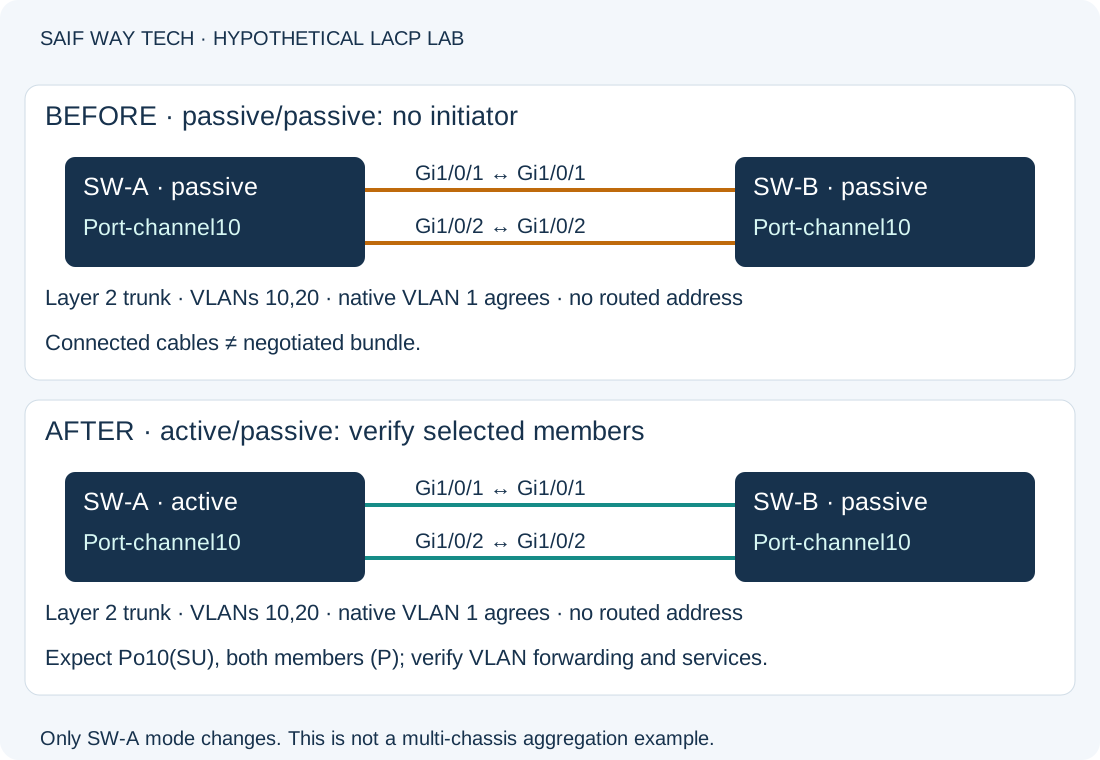
This guide targets Catalyst 9000 switches running IOS XE 17.x, using Cisco’s Catalyst 9000 EtherChannel troubleshooting reference. It does not cover NX-OS vPC, server teaming or multi-chassis aggregation. The lab has SW-A and SW-B connected Gi1/0/1 to Gi1/0/1 and Gi1/0/2 to Gi1/0/2. Both links belong to Layer 2 Port-channel10, intended to trunk VLANs 10 and 20. Native VLAN 1 agrees on both ends; these lab defaults are not a production design recommendation.
The injected fault is both peers configured LACP passive. Neither initiates negotiation. No IP subnet is assigned to the Layer 2 bundle. Other causes, including incompatible member settings, physical faults and wrong cabling, must be separated from this fault.
Read EtherChannel Summary and LACP Member Flags
Run these read-only commands in privileged EXEC on both switches. Do not start with shutdown/no shutdown or remove channel-group.
show etherchannel summary
show interfaces status
show running-config interface port-channel10
show running-config interface gigabitEthernet1/0/1
show running-config interface gigabitEthernet1/0/2
show interfaces gigabitEthernet1/0/1
show interfaces gigabitEthernet1/0/2
| Evidence | Normal for this lab | Abnormal interpretation and next action |
|---|---|---|
| EtherChannel summary | Po10(SU), each member marked (P) | S denotes Layer 2 and U in use. Read the output legend: (s) is suspended, (I) individual, (D) down. Flags vary by state; none alone establishes the root cause. |
| Interface status | Both links connected | Not connected/down: resolve optics, cable, administrative state or peer port first. |
| Port-channel configuration | Intended trunk, VLANs and native VLAN | Wrong logical settings: compare design and peer, then plan a coordinated correction. |
| Member configuration | Same group/protocol, compatible switching mode and negotiated speed | Passive/passive, static on versus LACP or inconsistent parameters: investigate the exact mismatch. Local group numbers do not have to match across peers. |
| Interface counters | Stable links, no growing physical error rate | Increasing CRC or flaps: inspect media and hardware before treating it as a protocol failure. Old cumulative errors need a time interval for interpretation. |
Member configuration and inherited logical settings interact on IOS XE. Compare operational state as well as the running configuration. Matching two pasted stanzas is not sufficient proof of compatibility.
Check LACP Negotiation, Partner Identity and Member Selection
The following commands inspect LACP neighbors, control packet counters, logs and actual forwarding. They remain read-only.
show lacp 10 neighbor
show lacp 10 counters
show logging
show interfaces trunk
show spanning-tree vlan 20
For a healthy bundle, the neighbor command should identify the intended remote system and member ports. The counters should show LACP exchanges on each member; compare two samples rather than assuming nonzero historical counters prove current health. Passive/passive may show no current peer and no new exchanges, but the same observation can result from a down link, protocol filtering or wrong cabling. Confirm both configurations before assigning this cause.
If packets arrive but a member is suspended, compare actor/partner information and member compatibility against Cisco’s troubleshooting guide. The logs may identify negotiation or consistency failures. Treat log lines as evidence from your device, not a message every failure must generate. Review show logging locally and sanitize it before sharing.
The trunk command should show the intended logical aggregate carrying VLAN 20. A healthy LACP bundle can still have the wrong allowed VLAN list. STP should see the logical path with the expected forwarding role; blocking can be correct when another path exists. Do not disable STP or force static mode on to bypass the symptom.
Identify the LACP Fault Before Changing Channel Mode
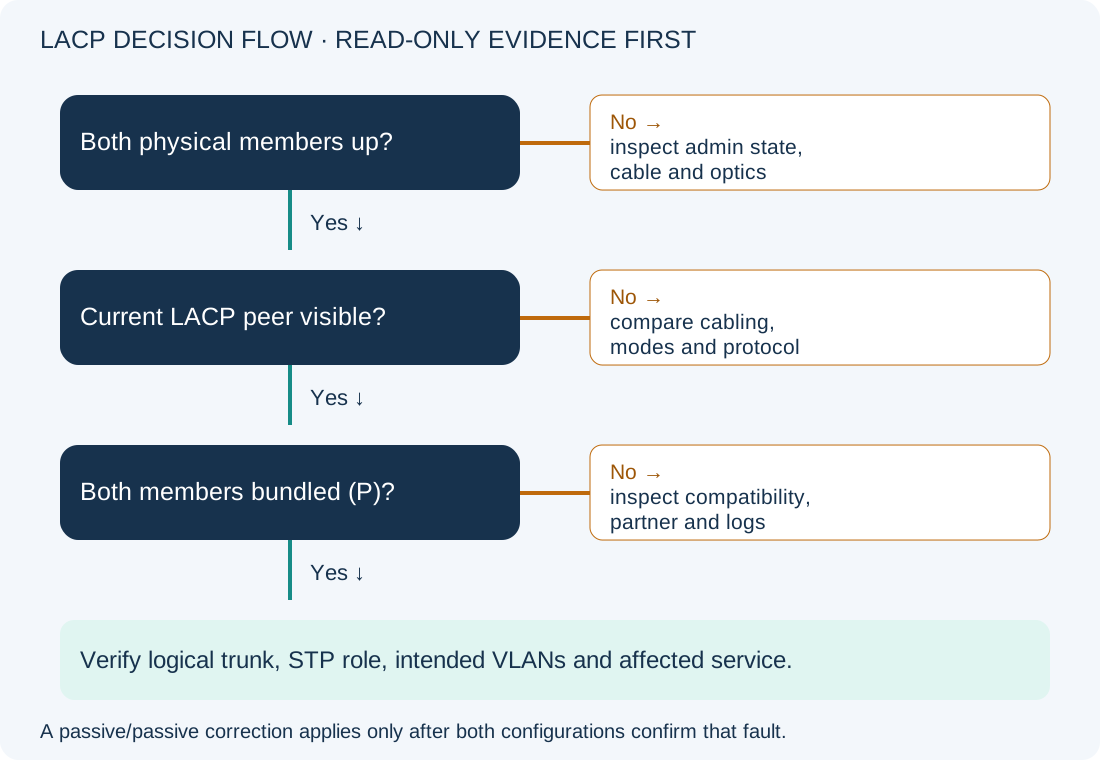
- Physical port down? Yes: repair the physical/admin issue, then recheck LACP. No: inspect peers.
- Current LACP peer visible? No: confirm cabling, mode and protocol on both ends. Passive/passive is one candidate. Yes: inspect selected membership and partner identity.
- Both members bundled (P)? No: compare compatibility and logs. Yes: troubleshoot logical trunk, STP and end-to-end service separately.
Correct a Confirmed LACP Passive-Passive Configuration
Configuration-changing: The baseline here already has a correctly defined trunk Port-channel10 and compatible members on both switches, with channel-group 10 mode passive on both sides. At least one side must actively initiate LACP. This example changes only SW-A. It is not a universal conversion recipe for an existing static channel.
Before changing a production aggregate, use out-of-band access, save both peers’ stanzas, verify an alternate path and schedule interruption. Changes can rebundle links or interrupt all traffic on the channel. If the device rejects the mode update, stop and plan a platform-specific rebuild; do not remove membership on a remote production uplink interactively.
configure terminal
interface range gigabitEthernet1/0/1 - 2
channel-group 10 mode active
end
This permits active/passive negotiation while preserving the existing trunk design. Active/active is also valid when intentionally configured. Confirm every member connects to the same intended partner system unless using a supported multi-chassis design.
For this isolated fault-injection lab, rollback restores SW-A to its recorded passive mode:
configure terminal
interface range gigabitEthernet1/0/1 - 2
channel-group 10 mode passive
end
That rollback deliberately restores the broken passive/passive example. In production, use the documented prior working state or approved alternate path; do not call restoration of a known outage service recovery.
Verify LACP Members, Trunk Forwarding and Service Recovery
Repeat the summary, neighbor and counter commands. Expect Po10(SU), both members (P), the correct partner and increasing LACP exchanges. Repeat trunk and STP checks, then test approved services in both VLANs. A single traffic flow may hash onto one member; a working ping does not prove even distribution or the health of both data paths.
During a separate approved resilience test, remove one member at a time using the site’s change procedure, confirm service continuity and restore it before testing the other. Do not perform this disruptive test merely to diagnose an incident. Persist accepted configuration with copy running-config startup-config after verification; it writes startup configuration.
Record actor/partner IDs, membership, logical VLANs and interface error deltas before changes. The existing pyATS pre/post-change guide describes a related validation approach. If the aggregate is healthy but a VLAN still fails, follow the gateway reachability guide.
Cisco EtherChannel Troubleshooting References
Cisco: Troubleshoot EtherChannels on Catalyst 9000 switches documents negotiation checks, counters, partner data and suspended-port investigation. Debug commands from that reference are intentionally not part of this first-line workflow; use a scoped, approved diagnostic plan if read-only evidence remains inconclusive.