A Windows VPN connection fails with error 720 and the user needs access to a business service. Reinstalling adapters immediately can erase useful evidence and introduce another problem. First identify the connection type, failure time and client/server conditions.
Lab status: This is a proposed exercise, not a completed device test or client case study. Code examples require validation against your image and dependency versions. My documented background is NOC/data center operations, multi-vendor Netmiko workflows and Python/Flask integration.
Offline example checks: October 20, 2026: PowerShell examples passed parser checks only. No Windows event collection, VPN connection or update operation was executed.
What does Windows VPN error 720 indicate?
Microsoft associates this error with a PPP protocol/configuration failure and documents adapter-binding and server-side address-allocation checks. The exact cause depends on the environment. A RasClient event can preserve the error and timing, but it should be correlated with server evidence.
Treat 720 as a connection-establishment failure needing correlated evidence, not a reason to reinstall every miniport. Record the exact VPN type, OS build and observed failure time. A RasClient event with the code identifies an attempt, not its definitive root cause.
Which server and addressing checks complement endpoint evidence?
If one workstation fails while a known-good peer succeeds using the same service, inspect its bindings and client-specific configuration. If many users fail together, ask the VPN owner for pool availability, DHCP dependency and server event evidence. Do not treat every 720 as proof of an exhausted pool.
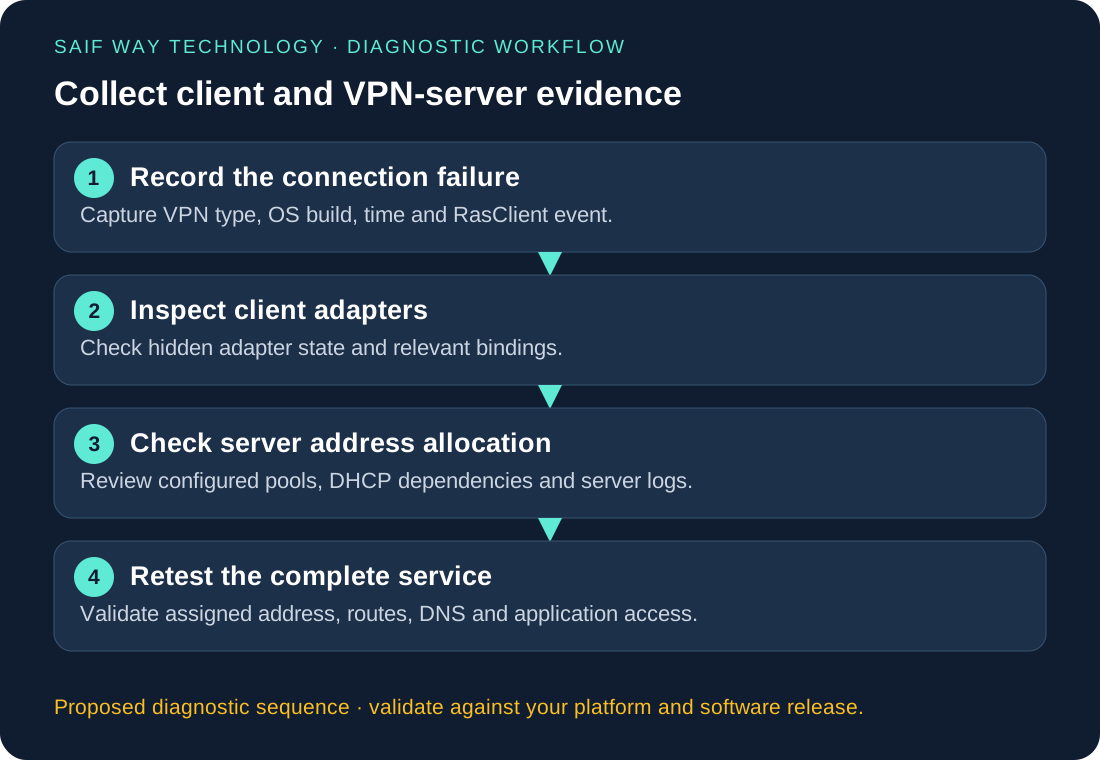
Proposed VPN lab: capture the connection type and failure context
Windows and a compatible VPN server are additional unconfirmed access requirements. The safe exercise is read-only evidence collection and fixture analysis until those are available. Preserve an alternate access path before any later approved adapter change.
PowerShell: collect adapter state and RasClient events
Use the time-bounded collector added below to distinguish unavailable logs from a completed query with no events. Event messages can contain usernames and internal addresses, so the default metadata report omits them. Retrieve full messages only in the restricted diagnostic session and correlate with the failed attempt.
Get-NetAdapter -IncludeHidden |
    Select-Object Name, InterfaceDescription, Status

Get-WinEvent -FilterHashtable @{
    LogName = 'Application'
    ProviderName = 'RasClient'
    Id = 20227
} -MaxEvents 10 | Select-Object TimeCreated, Id, Message
Time-bounded event metadata collector
$since = (Get-Date).AddHours(-2)
$queryState = 'completed'
$events = @()
try {
    $events = @(Get-WinEvent -FilterHashtable @{
        LogName = 'Application'; ProviderName = 'RasClient'
        Id = 20227; StartTime = $since
    } -ErrorAction Stop)
} catch {
    if ($_.FullyQualifiedErrorId -like 'NoMatchingEventsFound*') {
        $queryState = 'completed_no_matching_events'
    } else {
        $queryState = 'unavailable'
    }
}
[pscustomobject]@{
    QueryState = $queryState
    WindowStart = $since.ToUniversalTime().ToString('o')
    Events = @($events | Select-Object TimeCreated, Id, RecordId)
} | ConvertTo-Json -Depth 4
This is a proposed Windows collector. Only its PowerShell syntax is checked locally; event-provider and VPN/update behavior remain untested.
What evidence should guide adapter or VPN remediation?
Follow the branch supported by matched client/server evidence. Ask the owner to validate a targeted binding or pool correction in a disposable lab first. Capture a before-state and recovery procedure; this guide intentionally has no adapter-delete or blanket network-reset command.
How should you verify restored access to the business service?
After the approved correction, verify a new assigned VPN address, required routes, internal FQDN lookup and the same application operation that failed. A connected icon without the expected address or route is incomplete acceptance. Compare to the known-good client again if only the application remains broken.
Where can evidence collection be automated?
A bounded collector can package adapter IDs, event query state, build and failure window while avoiding credentials and unnecessary personal data. The support dashboard should expose unknown collection states and link to the responsible VPN administrator, not attempt automatic endpoint repair.
Related troubleshooting and implementation
Explore the network automation troubleshooting collection to connect this issue to adjacent workflows. The Netmiko, NETCONF and RESTCONF comparison helps when you are choosing an interface rather than fixing an existing implementation.