A Python script connects to a network device, sends a command and then raises Netmiko ReadTimeout: Pattern not detected. Does that mean the network is down, the command failed or the script expected the wrong response?
Those are different questions. A useful investigation starts with the operation that failed and the evidence returned by the device.
My portfolio includes multi-vendor Netmiko workflows, and my infrastructure background includes NOC/data center troubleshooting. This guide applies that experience to a focused diagnostic exercise. The GNS3/EVE-NG topology and code below are proposed lab instructions. They have not been executed against a network device for this article. There are no measured timings, captured device results or claimed production fixes here.
What does Netmiko ReadTimeout mean?
For a pattern-based command read, Netmiko waits for text indicating that the operation has finished. That can be the device prompt or a pattern supplied through expect_string. If the expected text does not arrive within the read deadline, a ReadTimeout can be raised.
The same exception can arise during session preparation, before your own command runs. Read the traceback to locate the failing call. See the maintainer’s explanation of read_timeout.
For send_command(), investigate two separate possibilities:
- The response is unfinished: the device may still be generating output.
- The expected text is wrong: the command may have finished, but its prompt does not match the script’s pattern.
Neither condition alone proves whether a configuration change succeeded. If a change was involved, inspect the resulting state before retrying it.
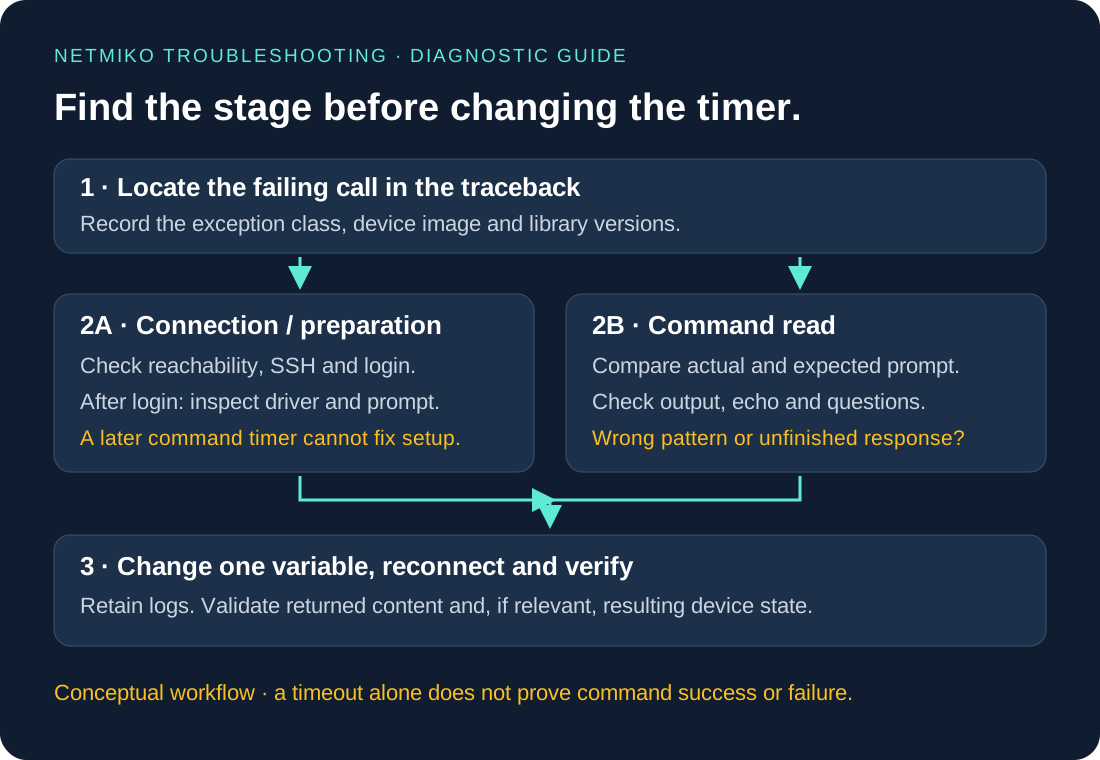
Did the timeout occur during connection or command reading?
| Where the failure occurs | Evidence to collect | Next investigation |
|---|---|---|
| TCP connection | Destination, port, route and manual SSH result | Management reachability and SSH listener |
| SSH negotiation or login | Exception class, SSH client diagnostics, authentication result | Banner, algorithms, credentials and AAA |
Inside ConnectHandler() after login |
Traceback and session log | Driver selection, terminal preparation and prompt behavior |
During send_command() |
Command, actual prompt, expected pattern and elapsed time | Pattern mismatch, incomplete output or interaction |
| During configuration | Commands sent and current device state | Partial application, command rejection and changed prompts |
Do not treat an authentication exception or an SSH negotiation failure as a command-read timeout. In particular, changing an argument on a later send_command() call cannot repair a connection object that never finished initializing.
Proposed GNS3/EVE-NG lab topology
Use one isolated management segment:
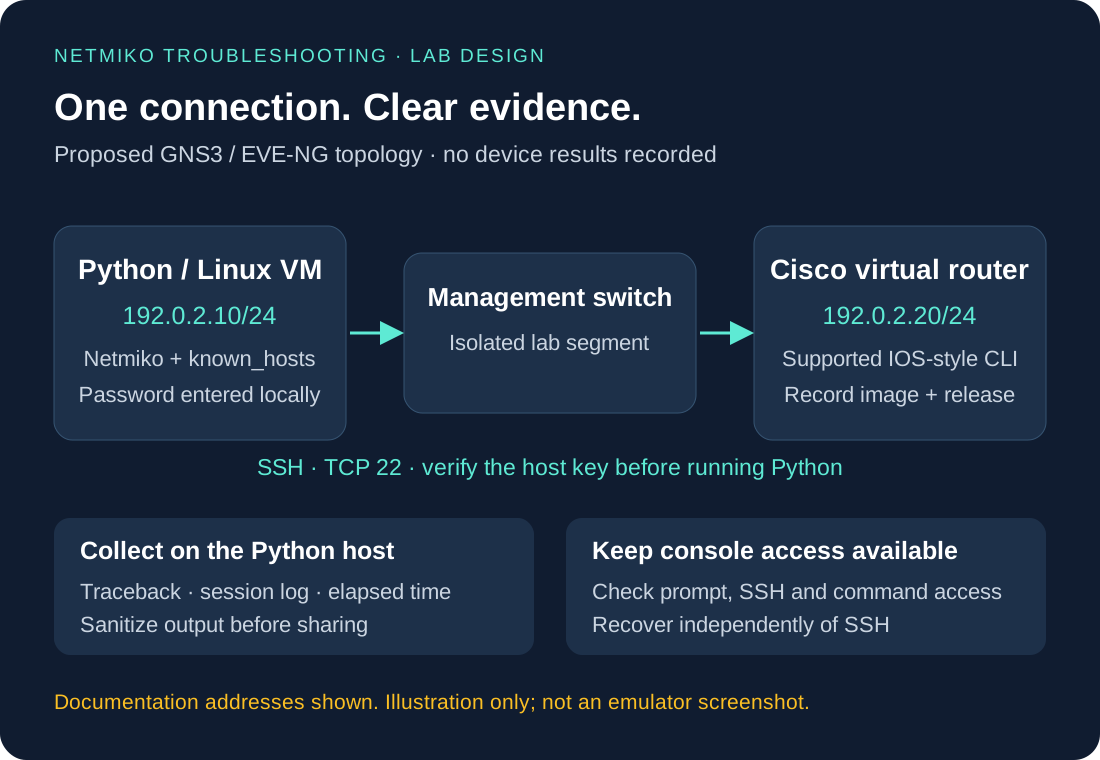
These are documentation addresses for the proposed isolated lab. Substitute an appropriate subnet if it overlaps with another network you use.
You need:
- GNS3 or EVE-NG and a legitimately available Cisco image supporting SSH and the example operational commands.
- A Linux VM, or another Python host, with management reachability to the router.
- Console access to configure the router and recover from mistakes.
- A dedicated lab login authorized for the commands you will run.
The emulator does not determine the device’s CLI features. Record the actual image, model and release. Start with a Cisco IOS/IOS XE-style image and check that the cisco_ios Netmiko driver is appropriate. Do not assume another vendor or controller uses that driver.
Before Python, configure the management address, SSH and local/AAA login using the documentation for your image. Log in manually from the Python host, verify the SSH host-key fingerprint through a trusted source such as the device console, and save the verified key in your user’s known_hosts file. Then run show clock and note the prompt. The code below deliberately requires a trusted host key.
Prepare Python and record Netmiko and device versions
The examples target the Netmiko 4.x API. Use a separate environment and record the version actually installed:
python3 -m venv .venv
source .venv/bin/activate
python -m pip install 'netmiko>=4,<5'
python --version
python -m pip show netmiko paramiko
python -m pip freeze > requirements-lab.txt
export LAB_ROUTER_HOST=192.0.2.20
export LAB_ROUTER_USER=labuser
This setup is for a Linux shell. Keeping the installed dependency list makes a later reproduction more useful than saying only that the script used Python and Netmiko.
Baseline: collect a prompt and one command
Save this example as readtimeout_lab.py inside your Python VM. The password is entered interactively. It is not stored in the inventory or source file.
import os
import re
from datetime import datetime, timezone
from getpass import getpass
from pathlib import Path
from time import monotonic

from netmiko import ConnectHandler
from netmiko.exceptions import (
    NetmikoAuthenticationException,
    NetmikoTimeoutException,
    ReadTimeout,
)


def main():
    log_dir = Path("lab-logs")
    log_dir.mkdir(mode=0o700, exist_ok=True)
    stamp = datetime.now(timezone.utc).strftime("%Y%m%dT%H%M%S%fZ")
    log_path = log_dir / f"router-{stamp}.log"
    # Create a private log file before Netmiko opens it.
    log_path.touch(mode=0o600, exist_ok=False)

    device = {
        "device_type": "cisco_ios",
        "host": os.environ["LAB_ROUTER_HOST"],
        "username": os.environ["LAB_ROUTER_USER"],
        "password": getpass("Lab SSH password: "),
        "ssh_strict": True,
        "system_host_keys": True,
        "conn_timeout": 10,
        "banner_timeout": 15,
        "auth_timeout": 15,
        "session_log": str(log_path),
        "session_log_record_writes": False,
    }

    stage = "connection and session preparation"
    started = monotonic()
    try:
        with ConnectHandler(**device) as conn:
            stage = "prompt discovery"
            prompt = conn.find_prompt()
            print(f"Observed prompt: {prompt!r}")

            stage = "show clock"
            started = monotonic()
            output = conn.send_command(
                "show clock",
                expect_string=re.escape(prompt) + r"\s*$",
                read_timeout=20,
            )
            print(output)
            print(f"Command returned after {monotonic() - started:.2f}s")
    except ReadTimeout as exc:
        print(f"ReadTimeout during {stage}: {exc}")
        return 1
    except NetmikoAuthenticationException as exc:
        print(f"Authentication failed during {stage}: {exc}")
        return 1
    except NetmikoTimeoutException as exc:
        print(f"Connection/session timeout during {stage}: {exc}")
        return 1
    finally:
        print(f"Session log: {log_path}")
    return 0


if __name__ == "__main__":
    raise SystemExit(main())
Run it with python readtimeout_lab.py. The numbers in this example are starting limits for the exercise, not measurements or recommended values for every device. A changed host key, missing environment variable or another SSH error may produce an exception outside these three handlers; retain that traceback rather than mislabeling it as ReadTimeout.
Session logs can contain sensitive output even when write recording is disabled. Review and sanitize them before sharing. This script is a diagnostic example, not a complete production collector.
Exercise 1: deliberately expect the wrong pattern
First establish that the baseline works on your image. Then, in a separate run, replace only the send_command() call with:
output = conn.send_command(
    "show clock",
    expect_string=r"LAB_PATTERN_THAT_SHOULD_NOT_EXIST_9F3A$",
    read_timeout=5,
)
Expected behavior, not an observed result: if the command runs and the chosen pattern never appears, the pattern-based read should reach its deadline. Check the traceback and session log to see whether the clock output and prompt arrived.
Restore the baseline pattern and reconnect before the next exercise. A fresh connection avoids carrying unread output from a deliberately failed read into another experiment.
This is a controlled way to examine pattern matching without claiming that the router is slow or changing its configuration.
Exercise 2: check expect_string against the actual prompt
expect_string is a regular expression. A hostname containing parentheses or other regex characters needs appropriate escaping if you intend a literal match. The baseline uses re.escape() for that reason.
Capture the prompt in the CLI mode where the command will run. A prompt captured before entering configuration mode may no longer match afterward. Also inspect unsolicited console messages, unexpected login dialogs and command confirmation prompts.
Use an explicit pattern only when you understand the response you are waiting for. For an ordinary operational command with a stable supported driver, Netmiko’s automatic prompt handling may be sufficient:
output = conn.send_command("show clock", read_timeout=20)
The Netmiko API reference documents these parameters and session logging. Avoid disabling command verification or changing drivers merely to hide an unexplained failure.
Exercise 3: investigate slow output separately
If your image supports it, try show version first and then a larger authorized read-only command. Record elapsed time, whether output is still arriving and whether the final prompt appears. Larger output is not guaranteed to be slow on your VM.
Only after identifying a command-read deadline as the problem, compare a larger finite limit:
output = conn.send_command("show version", read_timeout=60)
Do not force resource exhaustion to manufacture a result. If the command never times out in your lab, record that outcome. The deliberate mismatch exercise already tests a different failure mode.
When should you use send_command_timing?
Timing-based reads can be useful when completion is better identified through a pause in output than a stable prompt. For example:
output = conn.send_command_timing(
    "show clock",
    last_read=2,
    read_timeout=30,
)
Here last_read controls a final quiet-period check, while read_timeout bounds the overall read. A quiet interval does not prove that an operation succeeded or that every expected item was returned. Validate the content separately. See the maintainer’s timing-based command guide.
For interactive commands, identify each expected question and response before automating them. This article does not execute image installation, reloads or configuration changes. Those need a separate lab plan and recovery procedure.
What should a ReadTimeout troubleshooting record include?
For each run, save the following alongside sanitized logs:
| Field | What to record |
|---|---|
| Environment | GNS3/EVE-NG version, device image/release, Python and library versions |
| Baseline | Manual SSH result, command authorization and prompt |
| Failure | Exception class, traceback location, CLI command and matching pattern |
| Timing | Configured limits and measured elapsed time for the specific operation |
| Evidence | Whether command echo, output and the final prompt appeared |
| Change | One adjusted variable and the reason for changing it |
| Verification | Repeated command result, content checks and remaining uncertainty |
Do not record an empty response as success merely because no exception was raised. For a future multi-device tool, retain per-device outcomes and failure stages rather than converting every exception into a generic connection failure.
Netmiko timeout settings and validation: common questions
Will increasing read_timeout fix every pattern-not-detected error?
No. More time can help incomplete output finish. It cannot make an incorrect pattern match a different prompt, and it does not repair credentials or the management path.
How should you evaluate older delay_factor examples?
Check the installed Netmiko version and the method involved. For the Netmiko 4.x send_command() examples here, use the documented read_timeout interface. Older snippets may describe different behavior.
What remains untested on Cisco IOS XE?
No device run has been performed for this article. The instructions describe what to test and what evidence to retain. A version-specific conclusion requires a recorded run on that image.
How should a collector report ReadTimeout failures?
The next step is a small collector that records inventory, command results and categorized failures. My multi-vendor Netmiko project provides related project context. For choosing between CLI and model-driven interfaces, read Netmiko vs NETCONF vs RESTCONF.