An SSH banner error occurs early enough that your intended network command may never have been sent. Repeatedly changing the command timeout can therefore leave the real problem untouched. A better first step is to compare the destination, connection path and server response from the same automation host.
Lab status: This is a proposed exercise, not a completed device test or client case study. Code examples require validation against your image and dependency versions. My documented background is NOC/data center operations, multi-vendor Netmiko workflows and Python/Flask integration.
Offline example checks: October 20, 2026: the added helper/demo block executed with local fixtures, and related negative cases were checked offline. No live device, controller, fabric or service behavior was validated.
Where does the SSH protocol banner fit in the connection?
The SSH identification exchange is part of establishing an SSH session. It is different from a company login notice and different from the router prompt after authentication. Paramiko reporting that it could not read the protocol banner does not establish a bad password. The failure may involve the wrong service, a delayed response, a connection being closed or interference on the path.
Separate TCP connect, SSH identification, key exchange, authentication and CLI startup. A banner_timeout belongs to identification reading. A company MOTD after authentication is a different mechanism. The same top-level SSH exception can require server-side context; do not infer a precise cause from its class alone.
Why can manual SSH work while Paramiko fails?
From the automation VM run ssh -vvv -o StrictHostKeyChecking=yes -o UserKnownHostsFile=./known_hosts user@lab-host. Inspect the destination and the Remote protocol version evidence under restricted logging. If TCP opens and closes before identification, compare server connection limits and the destination service; if identification arrives late, measure that delay before changing one timer.
| Check | Useful evidence |
|---|---|
| Destination | Resolved address and configured SSH port |
| Network path | Route, source address and device-side connection logs |
| SSH service | Manual verbose SSH output and server logs |
| Load/concurrency | Number of simultaneous collectors and session limits |
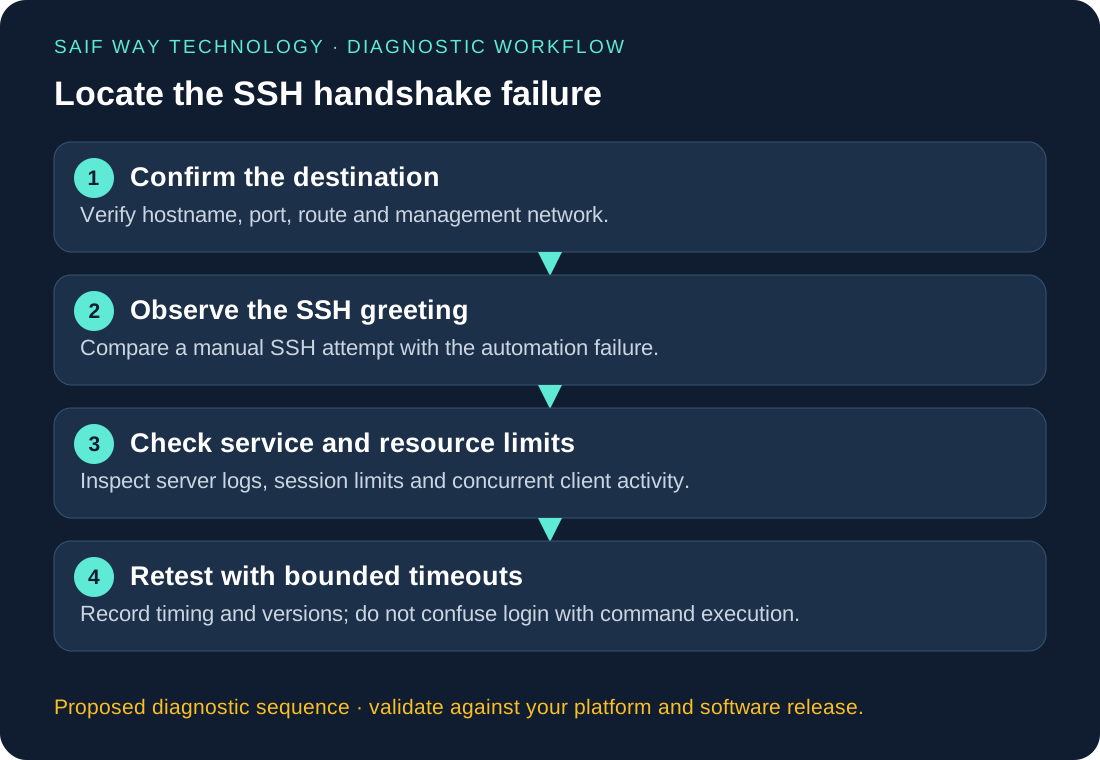
Proposed lab: compare SSH responses from the automation host
Keep the same VM, DNS resolution, port and SSH endpoint during comparison. Start with one connection, record a successful baseline, then repeat a small fixed number of attempts. A wrong service port and a delayed server greeting are different negative cases and may raise different exception types. Avoid scanning unrelated ports or stressing session limits.
Python: separate connection, banner and authentication timeouts
The classifier below groups failures for a report without printing raw exception text. It deliberately leaves a generic SSH protocol failure unresolved. Detailed Paramiko logging belongs in a restricted diagnostic run; a customer dashboard needs an error category, stage and correlation ID rather than credentials or connection banners.
import os
from getpass import getpass
import paramiko

client = paramiko.SSHClient()
client.load_system_host_keys()
client.set_missing_host_key_policy(paramiko.RejectPolicy())
try:
    client.connect(
        os.environ['LAB_HOST'],
        username=os.environ['LAB_USER'],
        password=getpass('SSH password: '),
        timeout=10, banner_timeout=15, auth_timeout=15,
        look_for_keys=False, allow_agent=False,
    )
    print('SSH authentication completed; no command executed')
finally:
    client.close()
Worked Python example and input contract
import socket

def classify_ssh_error(exc):
    # Report a category without printing exceptions that may disclose endpoints.
    import paramiko
    if isinstance(exc, paramiko.BadHostKeyException):
        return 'host_identity_changed'
    if isinstance(exc, paramiko.AuthenticationException):
        return 'authentication_failed'
    if isinstance(exc, (TimeoutError, socket.timeout)):
        return 'transport_or_stage_timeout'
    if isinstance(exc, paramiko.SSHException):
        return 'ssh_protocol_failure_requires_restricted_diagnostics'
    if isinstance(exc, OSError):
        return 'socket_or_path_failure'
    return 'unexpected_failure'

print(classify_ssh_error(TimeoutError('synthetic timeout')))
Would switching to Netmiko address the banner failure?
Both designs still depend on the transport handshake. After it succeeds, Netmiko can manage a supported network CLI’s prompt and paging. Migrating without recording the failing stage risks changing the symptom while retaining the original source-path or server-capacity fault.
What evidence should a banner-error support request include?
Include the attempted/failed count, timestamps, maximum simultaneous sessions and whether a server-side event matches the failure. Agree whether the engagement covers the Python worker, management path or SSH service. A bounded evidence-collection tool is within this guide’s scope; it is not a claim of tested fleet reliability.
How should you verify SSH connection recovery?
Repeat the original read-only job from the same execution account and environment. Capture both failures and successes. An authenticated session is only a handshake acceptance result; a separate command/output check must establish that the intended collection works.
Related troubleshooting and implementation
Explore the network automation troubleshooting collection to connect this issue to adjacent workflows. The Netmiko, NETCONF and RESTCONF comparison helps when you are choosing an interface rather than fixing an existing implementation.