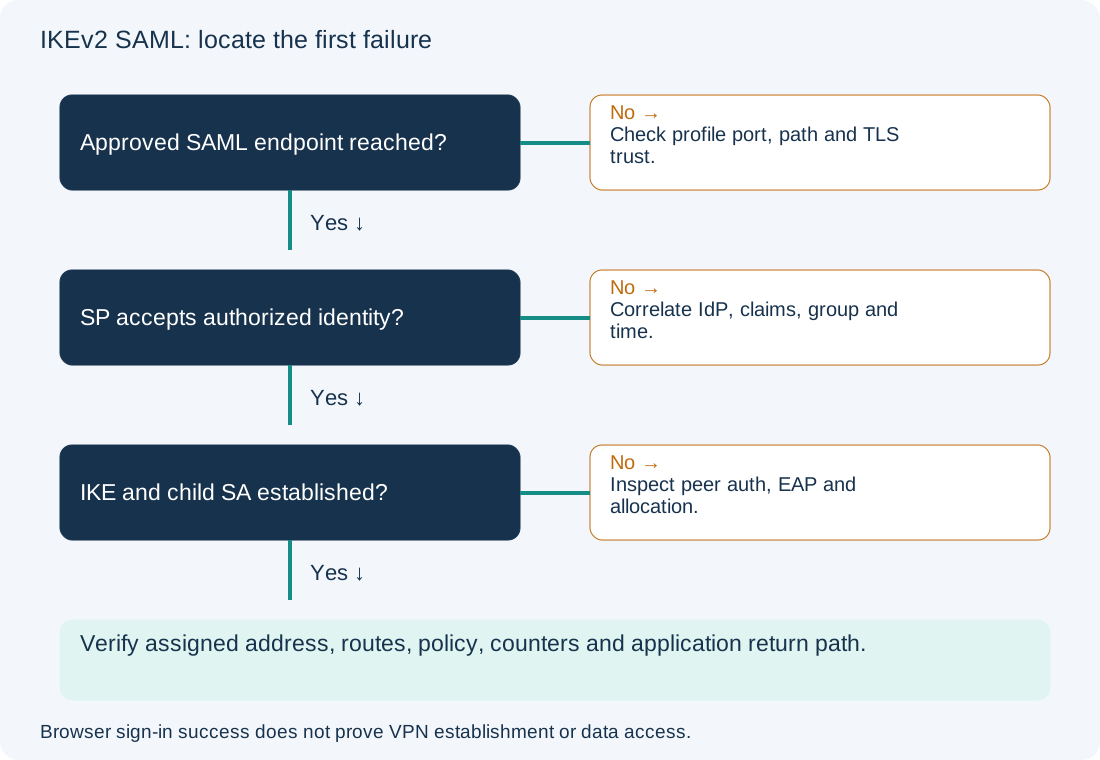
A successful identity-provider page does not establish an IPsec tunnel. FortiClient still needs the FortiGate to accept the authentication result, authorize the identity and establish the IKE/IPsec state. Conversely, a failure to open the SAML listener can occur before the browser reaches the IdP at all. Find the first failed stage in one timestamped attempt.
Scope and evidence: Proposed managed Windows FortiClient/EMS 7.4.x workflow using IKEv2, SAML and the embedded browser, with standard UDP IKE transport. The owner must verify the exact FortiClient, EMS and FortiOS patch compatibility first; this is not a compatibility matrix or upgrade recommendation. Fortinet’s 7.4.5 troubleshooting workflow is the procedural reference. External-browser and IPsec-over-TCP behavior varies by release and is outside this example. No actual tokens, debug logs or successful tunnel result are claimed.
Separate FortiClient SAML Login from IKEv2 Tunnel Establishment
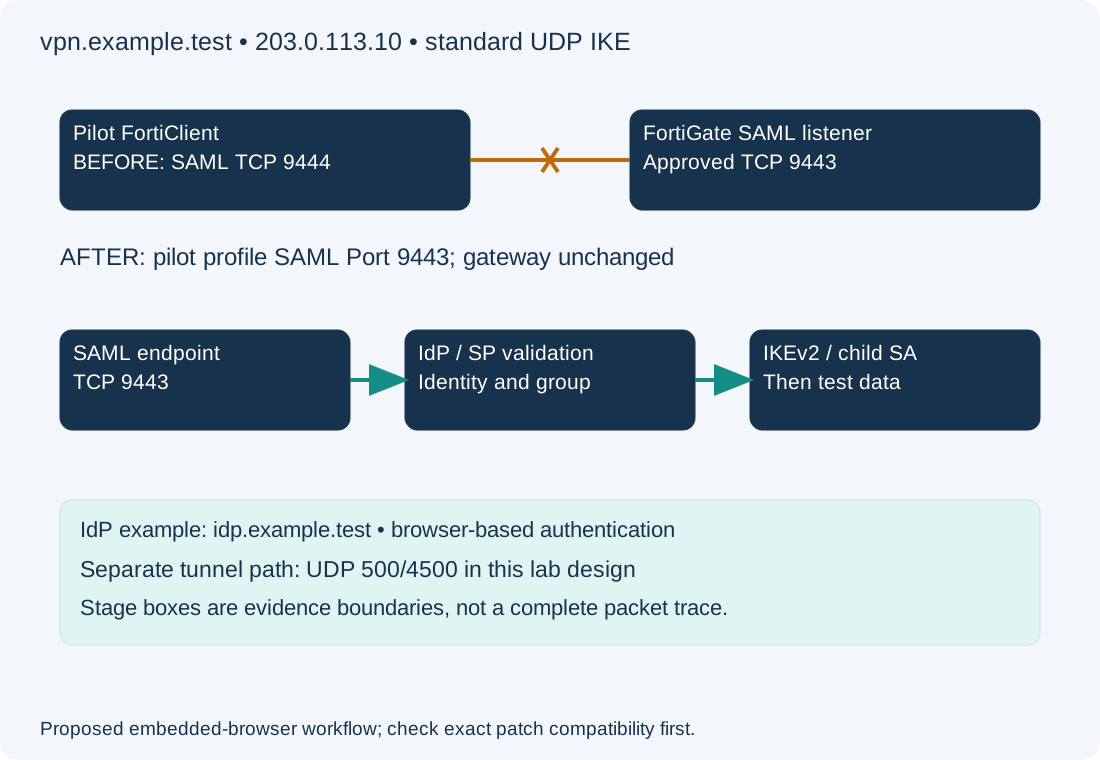
Illustrative gateway vpn.example.test resolves to 203.0.113.10. Its approved SAML authentication listener is TCP 9443, but a pilot endpoint profile mistakenly uses 9444. UDP 500/4500 is a separate IPsec path; it is not a substitute for the SAML listener. The example IdP name idp.example.test and all addresses are documentation placeholders. Certificates, metadata, EAP, authorized group mapping and the existing tunnel definition are assumed correct only for the controlled port-mismatch lab.
Record exact endpoint builds, browser mode, VDOM, gateway, transport, profile revision and clock/time zone. Changes in browser mode or transport can change the required path; do not transplant an SSL VPN SAML recipe onto an IKEv2 deployment. The FortiClient connection reference distinguishes SSO settings and transport options; its standalone UI is not the EMS profile editor.
Test the Approved FortiGate SAML Listener and Certificate Path
On the Windows client, read-only PowerShell probes:
Resolve-DnsName vpn.example.test -Type A
Test-NetConnection vpn.example.test -Port 9443 -InformationLevel Detailed
Expect the approved gateway address and TCP success for the correctly configured listener in this lab. Compare that approved port with the port actually delivered to the endpoint. TCP success is not a certificate validation, SAML exchange or UDP reachability test. A timeout on 9444 does not justify opening it if the design says 9443. Inspect certificate identity and trust through the supported client diagnostics; do not bypass validation or paste SAML assertions into online decoders.
The EMS 7.4.5 workflow checks IKE version, EAP, SAML enablement and the profile’s SAML Port against the FortiGate listener. It also checks the interface SAML association and group configuration. Use the matching Fortinet troubleshooting guide to inspect these dependencies before touching timers.
Correlate FortiClient, FortiGate and IdP Authentication Evidence
Use endpoint diagnostics, FortiGate VPN events and IdP sign-in records with a single time window. Preserve error text and correlation identifiers through an approved secure channel. Redact passwords, cookies, assertions, temporary tokens, user identifiers and public addresses before sharing evidence.
| First failed stage | Evidence boundary | Focused next step |
|---|---|---|
| Initial SAML endpoint | No connection to approved gateway listener | Compare DNS, delivered profile port, path and TLS identity |
| IdP sign-in or MFA | IdP rejects or cannot complete authentication | Review account/conditional-access evidence with identity owner |
| FortiGate assertion acceptance | Browser succeeds but SP validation fails | Compare entity/ACS metadata, signing trust, time and required claims |
| Group authorization or IKE/EAP | Identity result exists but tunnel authentication fails | Review group mapping, EAP, peer authentication and matching tunnel |
| Child SA/address assignment | IKE context exists but usable tunnel does not | Check proposals, selectors and mode-config/address allocation |
| Data after establishment | Tunnel state exists but application fails | Trace routes, policy, DNS, counters and return path |
These are evidence boundaries, not a complete packet-order specification; IKE and EAP details depend on the deployed design. Fortinet describes the browser/token-to-tunnel relationship in its SAML IPsec authentication flow. Check that release’s behavior against the actual deployment rather than assuming every 7.6 option exists in 7.4.
On the FortiGate, read-only status commands in the correct VDOM:
get system status
diagnose vpn ike gateway list
diagnose vpn tunnel list
Record whether the expected remote peer has an IKE context, whether a child SA exists, and whether counters move during an authorized application test. Other users’ active SAs do not prove this attempt succeeded. These outputs can contain sensitive topology/identity information. A connected GUI badge alone does not prove data forwarding; a missing badge can also be client-version behavior, so correlate actual state.
Collect Bounded Diagnostics for the Failed IKEv2 SAML Stage
If events do not distinguish SP validation from IKE authentication, have the authorized FortiGate owner run a short, filtered diagnostic window using the exact release’s command reference or support procedure. The vendor guide identifies ike, fnbamd and, where appropriate, samld, authd or eap_proxy diagnostics. Avoid enabling every daemon at maximum verbosity on a busy gateway. Filters and debug behavior vary by version; an IKE filter does not necessarily constrain SAML daemon output.
Agree the scope with other administrators before any global debug reset or disable. Stop collection immediately after one attempt, restore the prior diagnostic state, and secure the output. No unbounded debug command is required to prove this example’s delivered port mismatch. Before diagnosing a software defect, compare exact builds against the matching release notes; an entry in another patch’s notes is not a diagnosis of this endpoint.
Correct the Pilot EMS SAML Port Without Changing the Global Listener
Configuration change — hypothetical pilot endpoint profile. The VPN owner confirms the gateway’s approved TCP listener is 9443 and the pilot endpoint alone received 9444. Save the profile revision, assignments and original settings. In the EMS 7.4.5 workflow, open Endpoint Profiles → Remote Access, edit the pilot IPsec tunnel, and under Advanced Settings change its SAML Port from 9444 to 9443. Keep IKEv2, EAP, gateway, browser mode, peer authentication and group mapping unchanged. Verify the assignment affects only the pilot; clone/scope the profile first if it is shared.
Deploy through EMS and confirm that the endpoint received the new revision before retrying. Expected lab evidence is a request to the approved listener followed by the normal authentication and tunnel checks. Changing FortiGate’s global auth-ike-saml-port to match a mistaken client would affect other clients and is not the demonstrated correction. Do not extend timeouts, weaken certificate validation or broaden authorized groups to hide an unrelated stage failure.
Verify IKEv2 SAML Authentication, Tunnel Traffic and Profile Rollback
From the pilot, make one fresh attempt. Confirm the intended IdP authentication, gateway acceptance, authorized identity, IKE/child SA, assigned tunnel address and the approved application’s route and return path. Record each actual result rather than predicting success from the changed port. Test disconnect/reconnect through the normal client workflow; do not clear all users’ tunnels.
Rollback restores the saved pilot profile revision, resynchronizes only the pilot assignment and confirms delivery. It intentionally recreates the known wrong-port failure and may interrupt the pilot’s tunnel. A profile revert does not undo a gateway session or an IdP session; coordinate those separately if required. For clock-related assertion validity, see Windows Time checks. For post-authentication traffic, the NAT versus security-policy guide illustrates a related evidence boundary on a different firewall platform.