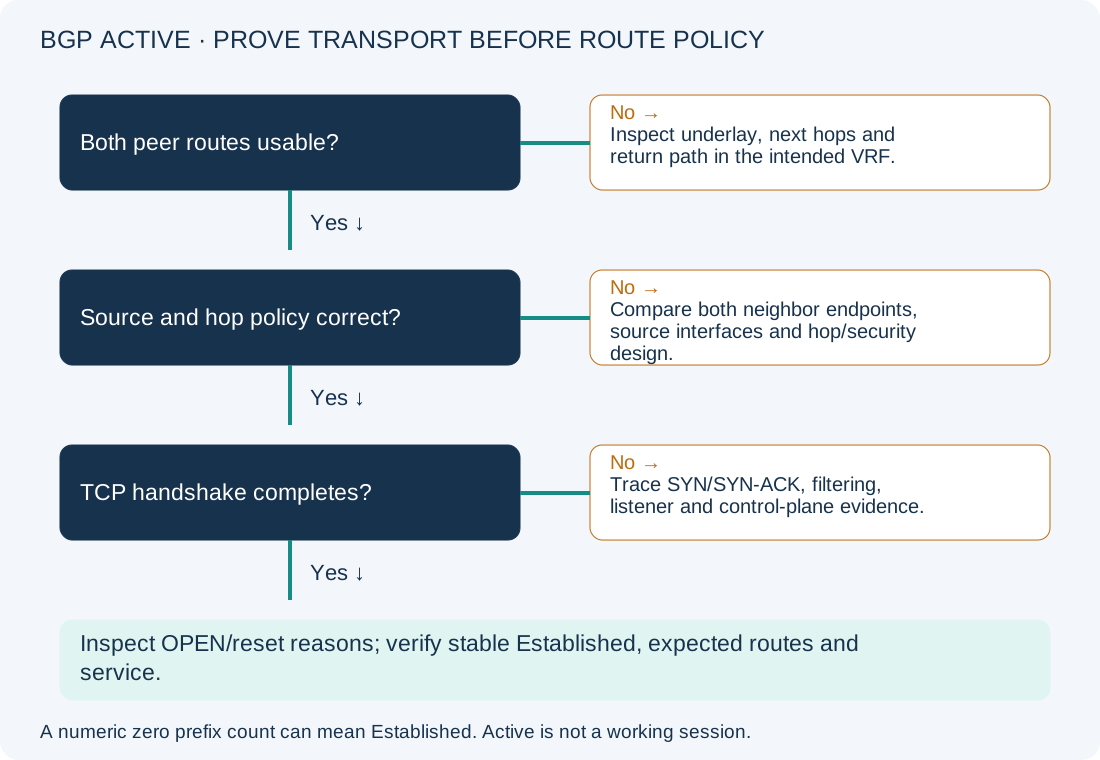
A BGP neighbor showing Active has not established the session. The word does not mean that routing is working. Start with the exact peer address, local source and two-way TCP path before changing route maps or prefix lists: those policies cannot repair a transport connection that never completes.
Scope and evidence: This is a hypothetical IPv4 eBGP lab, using Cisco IOS XE syntax and Catalyst 8000V 17.12 as the proposed platform. It is not IOS XR or NX-OS guidance. Addresses are documentation examples and AS 64512/64513 are private-use AS numbers. No live router test, captured handshake or customer outcome is claimed. Verify commands against your image and configuration context.
BGP Active State Symptoms and Loopback Peering Topology
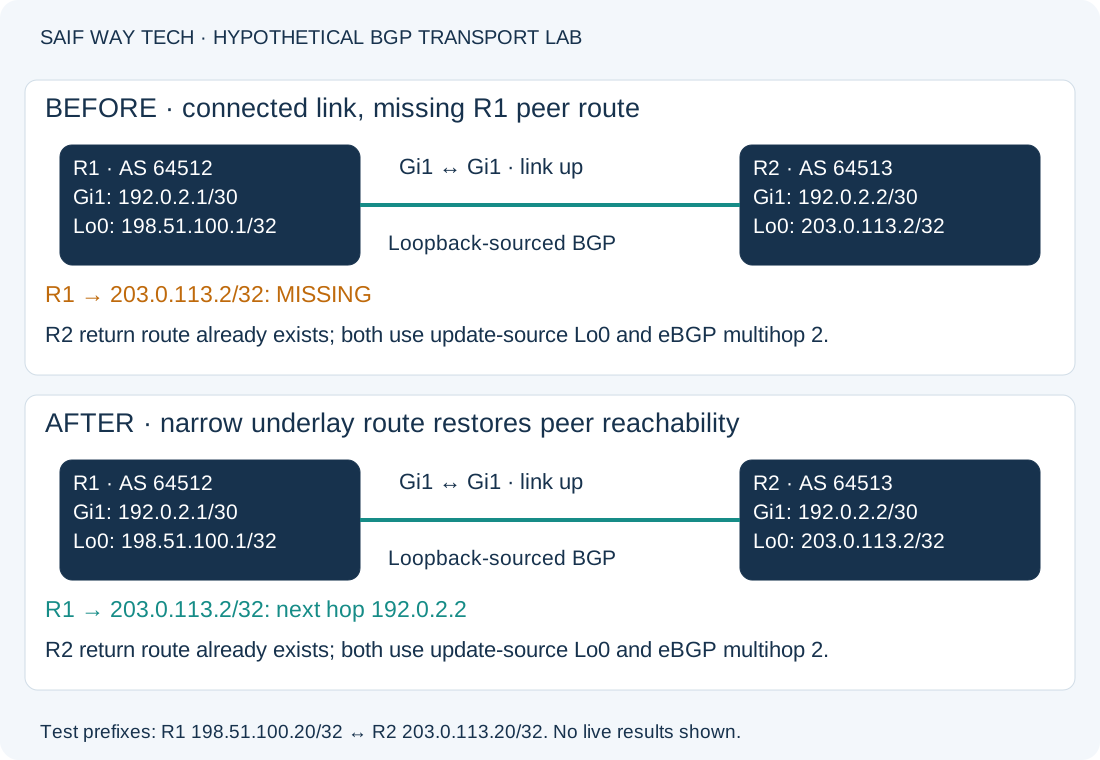
R1 Gi1 is 192.0.2.1/30; R2 Gi1 is 192.0.2.2/30. R1 AS 64512 peers from Loopback0 198.51.100.1/32 to R2 Loopback0 203.0.113.2/32 in AS 64513. Both neighbors already have the intended remote AS, update-source Loopback0, ebgp-multihop 2 and IPv4 unicast activation. This deliberately configured loopback design is different from single-hop peering between physical interface addresses.
The fault is a missing R1 route to 203.0.113.2/32, with no usable default route. R2 already has a static route to 198.51.100.1/32 through 192.0.2.1. R1 therefore cannot reach its peer or return traffic sourced from that peer, even though the physical neighbors can ping each other. The BGP state may cycle between connection states; record repeated samples rather than expecting one label indefinitely.
Check BGP Neighbor State and the Peering Source Address
Run these read-only privileged EXEC checks on R1. On R2, substitute peer 198.51.100.1 in the neighbor command and inspect its corresponding source and return route.
show ip bgp summary
show ip bgp neighbors 203.0.113.2
show ip interface brief
show running-config | section router bgp
show tcp brief all
| Evidence | Healthy interpretation | Abnormal result and next action |
|---|---|---|
| BGP summary | In the traditional IOS XE State/PfxRcd column, a numeric prefix count indicates Established | Active/Connect/Idle text means the session is not established. A numeric 0 can be a healthy session with no received prefixes; it is not the Idle state. |
| Neighbor details | Intended remote AS, local/remote endpoints and stable Established state | Compare last reset/error information. An AS or authentication rejection requires its own correction; Active alone does not identify one. |
| Interface summary | Physical path and intended Loopback0 up/up | Down or wrong-address source interface: inspect addressing and interface state before BGP changes. |
| BGP configuration | Intended source, neighbor, address family and deliberate hop limit | Unexpected peer/source or missing activation: reconcile with design. Do not copy ebgp-multihop into every single-hop session. |
| TCP summary | A corresponding established TCP connection once BGP succeeds | Repeated incomplete attempts support transport investigation; no visible entry in one snapshot is inconclusive. Correlate timing and endpoints. |
Configuration output can contain authentication material and internal routing details. Review it locally and sanitize it before sharing. Do not paste passwords or hashes into a public troubleshooting report.
Verify the Route to the Actual BGP Peer Address
These R1 queries are read-only:
show ip route 203.0.113.2
show ip route 192.0.2.2
The first should select a valid route to the BGP loopback peer. In this fault-injection example there is no matching route. The second should show the connected /30 path containing R2’s physical address. A working physical path does not supply the missing loopback route. An unexpected default, wrong VRF or recursively unresolved next hop is a different finding; investigate the route actually selected rather than adding a second route blindly.
The following commands generate limited ICMP traffic without changing configuration:
ping 192.0.2.2 repeat 5
ping 203.0.113.2 source 198.51.100.1 repeat 5
The first tests the directly connected link. The second uses the intended BGP source and destination; in a healthy lab it succeeds if ICMP is permitted and both routes work. ICMP failure can also reflect policy, so correlate it with routing evidence. Success does not prove TCP 179, authentication or BGP OPEN processing. Run the equivalent sourced peer-loopback probe from R2 as well.
For this example, R2’s route back to 198.51.100.1 must be confirmed before attributing the fault solely to R1. Do not rely on routes that this not-yet-established BGP session itself is expected to provide; the transport endpoints need independent reachability.
Distinguish BGP TCP Reachability from OPEN Rejection
Use an approved, short capture or existing firewall/session evidence for the loopback endpoint tuple. BGP normally listens on TCP 179, while the initiating endpoint also uses an ephemeral source port. Either peer can initiate; a rule that permits just one assumed packet direction can be misleading.
- SYN leaves but never arrives at the peer: inspect the selected path, ACL/firewall counters, hop limit and control-plane policy.
- SYN arrives but no usable SYN-ACK returns: inspect the listener/neighbor configuration, return route and security policy. A missing return route can break the handshake even when the initiating peer has reachability.
- Reset or BGP NOTIFICATION appears: inspect its exact stage/reason. Unknown neighbor source, AS mismatch and authentication problems need different evidence from silent filtering.
- TCP completes but BGP does not remain Established: continue with OPEN/capability and reset evidence. Do not label every later failure as TCP loss.
Restore the Confirmed Missing BGP Underlay Route
Configuration-changing, R1 only. In this isolated lab, the intended design is a host route through directly connected R2. Record the routing baseline and have console/out-of-band access: even a narrow route can redirect traffic. Confirm the next hop, VRF and absence of an intended alternative. Production underlay routing may be managed by another protocol or team.
configure terminal
ip route 203.0.113.2 255.255.255.255 192.0.2.2
end
This installs only the peer host route. It does not alter BGP policies, credentials or timers. Allow the existing neighbor retry process to reconnect; a blanket BGP clear is not part of this repair. Do not redistribute the transport route unless that is separately required by the design.
For this exact baseline, rollback is:
configure terminal
no ip route 203.0.113.2 255.255.255.255 192.0.2.2
end
Removing it restores the lab failure. A production recovery plan must identify a prior working path rather than treating restoration of the fault as restored service.
Verify BGP Establishment, Learned Routes and Service Traffic
Repeat the peer route, sourced ping, BGP summary, neighbor and TCP checks. Expect the host route through 192.0.2.2, a stable Established session and the intended source endpoints. A numeric received-prefix count verifies session state, not routing correctness.
For independent route testing, assume the lab already advertises R2 Loopback10 203.0.113.20/32 and R1 Loopback10 198.51.100.20/32, with intended policies permitting both. On R1:
show ip bgp 203.0.113.20
show ip route 203.0.113.20
ping 203.0.113.20 source 198.51.100.20 repeat 5
The first checks reception/path information for the test prefix; absence after establishment directs you to advertisement and filtering. The second checks whether the intended path actually entered the routing table; a received prefix may lose selection. The ping checks service-loopback forward and return reachability if ICMP is allowed. Repeat symmetrically on R2 and validate the original application before accepting the change.
Use copy running-config startup-config only after acceptance; it writes persistent configuration. Monitor resets and route stability over the agreed observation window.
Prevent BGP Source-Path Failures and Review Cisco References
Document each peer’s transport endpoints, owning underlay routes, source interface, AS and hop/security policy. Include sourced peer tests in pre/post-change checks. For related investigations, see the OSPF EXSTART guide, hybrid data-center design article and NOC workflow.
- Cisco: BGP basic troubleshooting, for transport reachability, source and session prerequisites.
- Cisco: BGP neighborship connection issues, for Active-state investigation and distinguishing connection from configuration failures.