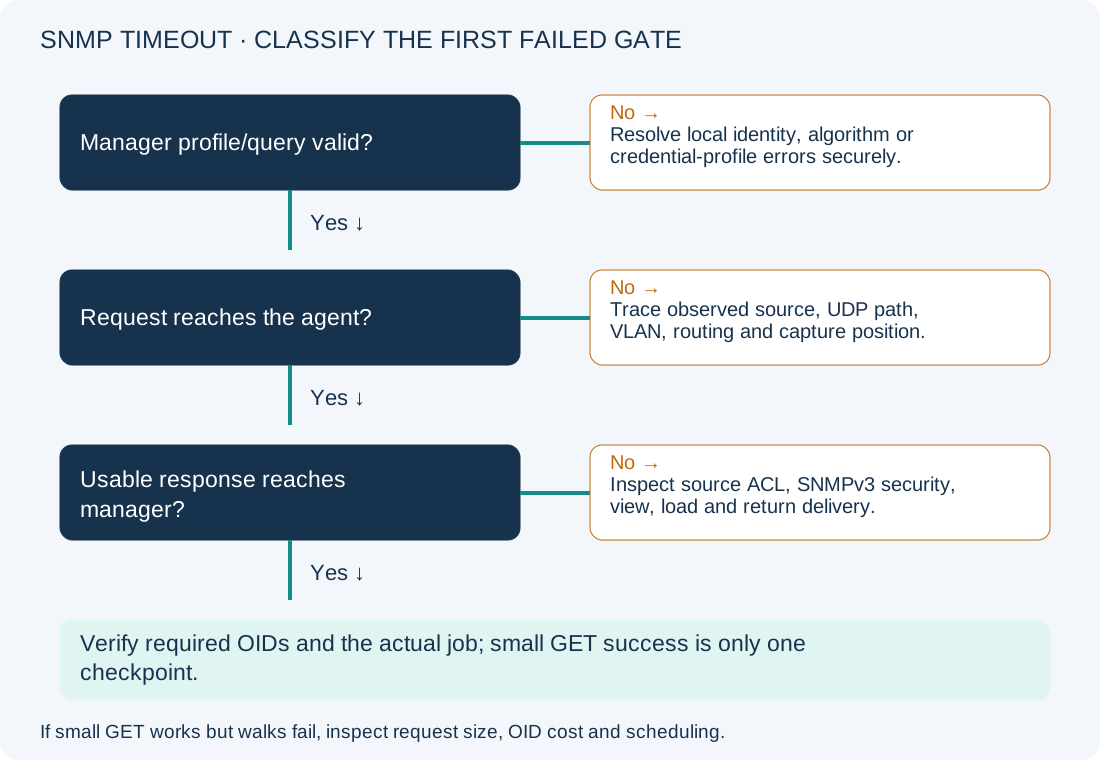
An SNMP timeout means the poller did not obtain a usable response within its request/retry behavior. It does not prove the device is down or that a password is wrong. Test from the actual collector, distinguish a small GET from a large walk, and follow the request and response path before increasing timeouts or opening an ACL.
Scope and evidence: Hypothetical SNMPv3 authPriv lab with Ubuntu 24.04/Net-SNMP 5.9 tools and a Catalyst 9300 IOS XE 17.15 agent. No real credentials, production packets or measured collection results are shown. IOS XE syntax is kept separate from Linux Bash. Agent and manager must support and agree on the configured authentication/privacy algorithms.
SNMP Polling Timeout Symptoms and the Source-ACL Lab
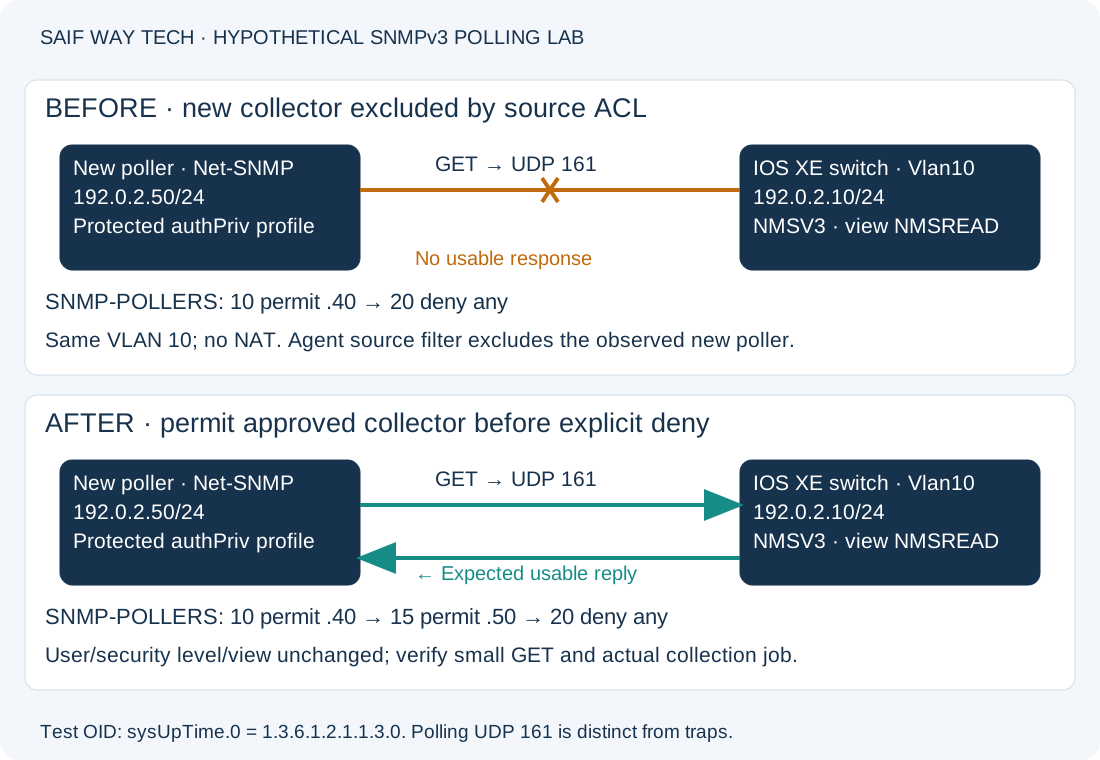
The new poller is 192.0.2.50/24; the switch’s management SVI Vlan10 is 192.0.2.10/24. Both are on the same isolated VLAN, with no NAT or VRF in this lab. Existing SNMPv3 user/group membership and read view NMSREAD are valid, and the view permits sysUpTime.0 (1.3.6.1.2.1.1.3.0).
SNMP group NMSV3 uses standard source ACL SNMP-POLLERS. Its recorded baseline is sequence 10 permitting old poller 192.0.2.40, followed by sequence 20 denying any other source. The new .50 poller is therefore excluded. This example changes the ACL only after the observed source, group attachment and credential/view checks establish that cause.
Run a Small SNMP GET from the Actual Monitoring Collector
Run diagnostics in the same host/container/network namespace and account context as the failing collector where possible. A working query from an administrator’s laptop does not validate the collector’s source or credential profile.
Use an already provisioned, owner-only Net-SNMP client configuration for the authorized user. The private ~/.snmp/snmp.conf profile must supply defSecurityName, the matching defAuthType/defPrivType and credential material such as defAuthPassphrase/defPrivPassphrase through your approved credential workflow. Do not commit it to the repository, print it into diagnostics or put passphrases into command-line flags/history. This guide does not create users or weaken authPriv to work around a timeout.
These Linux commands inspect the selected route and perform one small query:
ip route get 192.0.2.10
snmpget -v 3 -l authPriv -t 2 -r 1 -On 192.0.2.10 1.3.6.1.2.1.1.3.0
The route should select the intended interface with source 192.0.2.50 in this lab. A different source or namespace directs you to collector routing/binding configuration before editing the switch. The query should return the numeric OID with a Timeticks value if transport, security and the view permit it. The value is not a fixed expected number and may reset after a device restart.
-t 2 sets the request timeout and -r 1 limits retries; discovery and library behavior mean this is not a guaranteed whole-process deadline. A timeout leads to path/security investigation. A local missing-user/profile/algorithm error is a manager setup issue, not evidence that UDP traffic was dropped. A returned authorization/OID error is different from no usable response; preserve the actual error type.
Trace SNMP Requests and Responses on UDP 161
Standard polling targets UDP 161; traps/informs usually involve UDP 162 and are a different path. A TCP port test such as a Windows TCP connectivity check to port 161 does not establish UDP polling health.
On an authorized Linux collector with tcpdump and GNU timeout, start this bounded observation in a second terminal before running the GET. Replace eth0 with the interface identified above. Capture access normally requires root or delegated packet-capture capability; this command observes packets without changing agent configuration.
sudo timeout 15s tcpdump -ni eth0 -c 20 'host 192.0.2.10 and udp port 161'
Expect a request toward agent UDP 161 and a corresponding reply toward the collector’s request socket. Check timing, addresses and direction. Authenticated/encrypted SNMPv3 payloads cannot be interpreted as plain GET contents from this summary; use authorized manager/agent evidence to identify protocol results. SNMPv3 engine discovery/REPORT exchanges can occur normally, so a packet labeled REPORT is not automatically a credential failure.
| Observation | Likely investigation | Next evidence |
|---|---|---|
| No request leaves collector | Wrong namespace/interface, local configuration or collection task failure | Compare route/source, tool error and actual service execution context. |
| Request leaves but does not reach agent | Path, VLAN, routing, firewall or capture placement | Observe the agent-side path and targeted policy counters. |
| Agent sees request; usable reply absent | Source ACL, security/user/engine, view/processing or control-plane policy | Inspect agent counters and SNMP configuration; timeout alone cannot choose among them. |
| Reply returns but collection still fails | Manager security/profile, engine state or application parsing | Preserve the manager error and compare with one small authorized query. |
| Small GET works, large walk times out | Bulk size, response fragmentation, slow OID, load or collection schedule | Narrow the OID/subtree and request size; do not widen source access unnecessarily. |
Inspect IOS XE SNMPv3 Security, Views and Source ACLs
Use these read-only privileged EXEC commands on the switch. Keep user identifiers, engine information and configuration evidence sanitized when sharing.
show snmp
show snmp user
show snmp group
show snmp view
show access-lists SNMP-POLLERS
show processes cpu sorted 5sec
show snmp provides agent request/error counters; compare samples around the small query instead of treating historical totals as a current incident. The user/group checks should show the intended account, authentication/privacy settings and group association. Group NMSV3 must require the intended security level, reference read view NMSREAD and apply the source ACL being inspected. User details are not equivalent to a successful authentication test.
The view should include the test OID/subtree without an exclusion that changes the result. View denial is not automatically a generic network timeout; distinguish errors and inaccessible OIDs from silent loss. The ACL should show permitted sources in the intended order. In this lab sequence 20 would deny .50; adding a later permit after that deny would not fix ordering. Counter behavior varies by feature/platform, so absence of an ACL hit increment is not proof the ACL is unused.
The CPU command checks whether load may delay responses. A normal sample does not exclude a slow individual OID. If only broad walks fail, compare collection size/rate, selected subtree, logs and release-specific agent behavior before changing security. Increasing the poller’s timeout can obscure a repeated processing issue.
Permit Only the Approved SNMP Poller Source Address
Configuration-changing; switch admin access and change authorization required. Confirm that the agent actually sees .50, the group uses this ACL, credentials/view are already correct, and the recorded ACL has permit sequence 10 followed by deny sequence 20. Check whether another feature also references this ACL; a shared list can have a wider impact than SNMP. Preserve the baseline and management path.
configure terminal
ip access-list standard SNMP-POLLERS
15 permit host 192.0.2.50
end
This inserts one host before the explicit deny. It does not replace the ACL, remove the old poller or grant a write view. Do not reuse sequence 15 if it already contains a required entry. A different observed source through NAT or another collector requires a different authorized design, not an invented address permit.
For this exact baseline, rollback removes only the newly added sequence:
configure terminal
ip access-list standard SNMP-POLLERS
no 15
end
That restores the lab’s blocked new source. Production rollback must preserve existing monitoring and the approved recovery path. No community downgrade, user recreation, engine-ID change or global ACL removal is part of this fix.
Verify SNMP GET and the Production Monitoring Query
Repeat the ACL inspection and the same protected-profile snmpget from .50. Expect a usable sysUpTime.0 response with the unchanged security level. Correlate return packets and agent counters where meaningful, then run a limited instance of the actual authorized collection job. Confirm its required OIDs, parser outcome and alert recovery rather than declaring success from one OID alone.
If the small GET succeeds but the full job still times out, investigate request sizing, OID latency and scheduling in the corresponding branch. Check the existing .40 collector remains permitted. Persist the accepted switch configuration with copy running-config startup-config only after review; it writes startup configuration.
Prevent SNMP Poller-Source Errors and Review References
Keep collector source addresses, management VRFs, group/view ownership and protected credential profiles in the monitoring handover. Test new collectors before retiring old ones. Retain typed outcomes for timeout, authentication and unsupported OID so automation can escalate the right failure. See the NOC workflow and pre/post-change evidence guide for related operational patterns.
- Cisco: troubleshoot SNMP basic functionality.
- Cisco IOS XE SNMP management configuration, for group/view/source-access relationships; validate the installed release’s supported syntax and algorithms.
- Net-SNMP: snmpget, shared client options and private client configuration.