
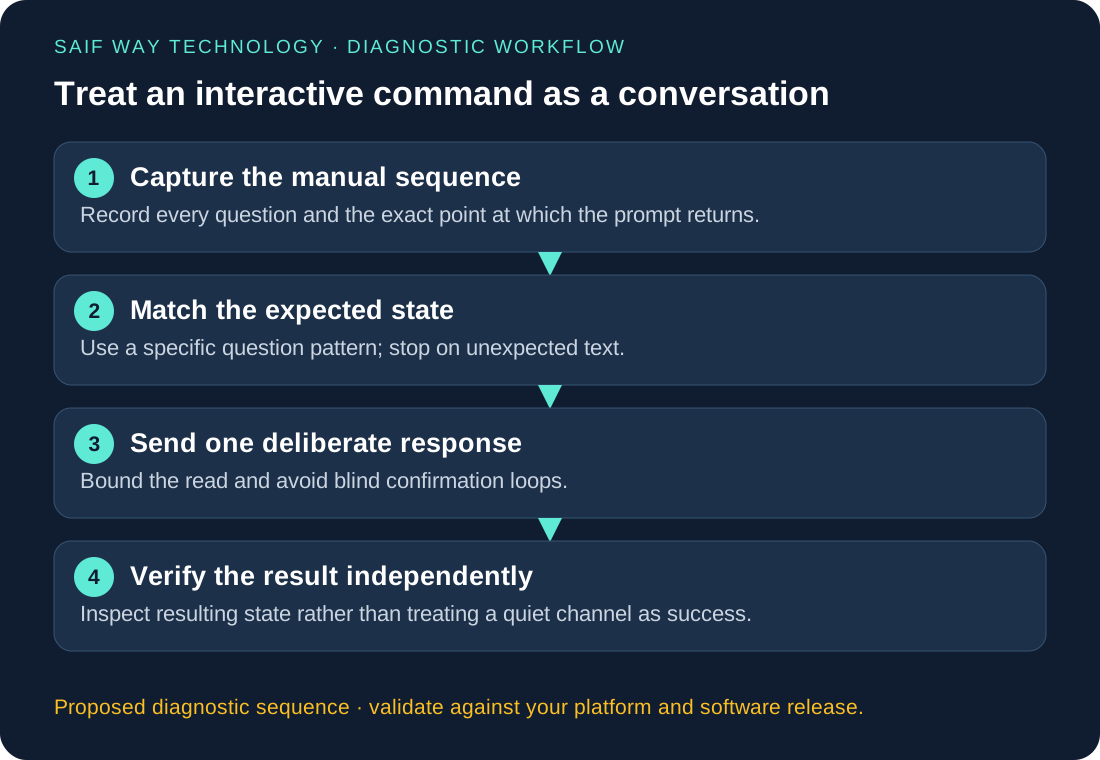
Netmiko send_command_timing helps when a device asks a question before returning to its normal prompt. It does not decide whether that question is safe to answer. A script that repeatedly sends Enter or yes can follow an unexpected branch without noticing.
Lab status: This is a proposed exercise, not a completed device test or client case study. Code examples require validation against your image and dependency versions. My documented background is NOC/data center operations, multi-vendor Netmiko workflows and Python/Flask integration.
Complete a bounded IOS-style extended-ping conversation, and separate dialog completion from packet-test success.
How do last_read and read_timeout affect send_command_timing?
Pattern-based send_command normally waits for a prompt or an explicit expect_string. Timing-based collection watches for a quiet interval instead. In Netmiko 4.7.0, last_read controls the final quiet-read interval and read_timeout bounds the read operation. Setting the timeout to zero removes that bound; this guide keeps finite deadlines. See the maintainer’s timing guide.
Silence can mean “waiting for input,” “command finished,” or “device paused.” The program must inspect the returned text to distinguish those states. Increasing a timeout does not supply a missing answer.
| Method | Suitable situation | Caller still must validate |
|---|---|---|
send_command(..., expect_string=...) |
Next prompt is known and stable | Pattern specificity and resulting state |
send_command_timing(...) |
Next output is collected by a pause | Expected question, allowed response and final outcome |
| Multiline command helpers | A reviewed fixed sequence fits the helper’s contract | Unexpected branches, budgets and operation result |
Use Python 3.10+ and Netmiko 4.7.0 for the code below. This is one IOS-style dialog profile. Junos, NX-OS and other network operating systems may use different ping syntax, prompt text and privilege rules. Do not present this sequence as a multi-vendor command abstraction.
Why does a completed ping dialog not guarantee reachability?
The script has two independent acceptance conditions. First, every expected question must appear at the end of its response, followed eventually by the original exec prompt. Second, the final output must contain a consistent two-probe ping summary.
Two lost packets still mean the dialog completed. They do not prove the target is down: an ACL, source selection, routing, return path or control-plane policy may explain the loss. Conversely, a router prompt without a recognizable summary is an unknown execution outcome, not a successful ping.
Guardrail: an unexpected prompt stops the script. It does not send a speculative confirmation, Ctrl-C sequence, reload answer or fallback password. Closing the SSH session restores the automation boundary; it does not guarantee that an arbitrary remote operation was cancelled. That is why the exercise uses a small packet test rather than a firmware or configuration operation.
Proposed EVE-NG/GNS3 lab: record the extended-ping dialog
- Connect a Linux Python VM and an IOS-style router through an isolated management network. Add a second lab router or endpoint reachable from the first router for the packet test. Use only targets you control.
- Record the image release and manually enter
pingwith no arguments. The program below expects protocol, target, repeat count, datagram size, timeout, extended-command and sweep questions in that order. If the image differs, stop and author a separate reviewed profile. - Confirm the starting prompt is exec mode, not configuration mode. Record the exact final prompt and summary format. Do not invent a transcript from the expected prompts in this article.
- Verify SSH host fingerprints out of band and populate a dedicated
known_hosts. Use an account authorized for the packet test, with no password or private key embedded in code. - Run with a reachable lab endpoint. Repeat with an owned endpoint that intentionally does not answer. Record dialog status separately from received packet count. Keep the short probe count and timeout.
- Exercise an unexpected question and a timeout using local fakes first. Do not create production changes solely to trigger an alternate confirmation.
python3 -m venv .venv
source .venv/bin/activate
python -m pip install "netmiko==4.7.0"
python -m pip freeze > requirements.lock.txt
python interactive_ping.py 192.0.2.11 192.0.2.12 ./known_hosts
echo $?
Replace the documentation addresses with your lab management host and approved ping target. The target is validated as IPv4; that prevents command-text injection but does not authorize the target. An enterprise wrapper must also enforce inventory and network-scope allowlists.
Python: validate each question before sending a response
Save as interactive_ping.py. Empty string responses are normalized by Netmiko into Enter. strip_prompt=False keeps the final prompt available for validation. The code sends two probes with a one-second device timeout and declines extended options and sweeping.
"""One explicitly reviewed IOS-style extended-ping dialog, not a generic confirmer."""
import argparse
import getpass
from ipaddress import IPv4Address
import json
from pathlib import Path
import re
from time import monotonic


def run_ping(conn, target, budget=90, clock=monotonic):
    target = str(IPv4Address(target))  # Prevent CLI injection through target text.
    deadline = clock() + budget
    prompt = conn.find_prompt().strip()
    if not prompt or not re.fullmatch(r'[^\r\n()]+[>#]', prompt):
        raise ValueError('not_an_exec_prompt')

    def exchange(answer):
        remaining = deadline - clock()
        if remaining <= 2:
            raise TimeoutError('dialog_deadline')
        # Keep prompt text: the final prompt is a separate acceptance condition.
        return conn.send_command_timing(answer, last_read=1,
            read_timeout=min(15, remaining), strip_prompt=False, strip_command=False)

    stages = [
        (r'Protocol \[ip\]:', ''),
        (r'Target IP address:', target),
        (r'Repeat count \[5\]:', '2'),
        (r'Datagram size \[100\]:', '100'),
        (r'Timeout in seconds \[2\]:', '1'),
        (r'Extended commands \[n\]:', 'n'),
        (r'Sweep range of sizes \[n\]:', 'n'),
    ]
    reply = exchange('ping')
    for number, (question, answer) in enumerate(stages, 1):
        if not re.search(question + r'\s*\Z', reply):
            raise RuntimeError(f'unexpected_prompt_at_stage_{number}')
        reply = exchange(answer)
    if not re.search(r'(?m)^' + re.escape(prompt) + r'\s*\Z', reply):
        raise RuntimeError('final_prompt_missing')
    match = re.search(r'Success rate is (\d+) percent \((\d+)/(\d+)\)', reply)
    if not match:
        raise RuntimeError('ping_summary_missing')
    percent, received, sent = map(int, match.groups())
    if sent != 2 or not 0 <= received <= sent or percent != received * 100 // sent:
        raise RuntimeError('inconsistent_ping_summary')
    return {'dialog': 'completed', 'sent': sent, 'received': received,
            'reachability': 'all_replies' if received == sent else 'loss_observed'}


def main():
    parser = argparse.ArgumentParser()
    parser.add_argument('host')
    parser.add_argument('target', type=IPv4Address)
    parser.add_argument('known_hosts', type=Path)
    args = parser.parse_args()
    from netmiko import ConnectHandler
    try:
        if not args.known_hosts.is_file():
            raise ValueError('missing_known_hosts')
        with ConnectHandler(device_type='cisco_ios', host=args.host,
                username=input('SSH username: ').strip(),
                password=getpass.getpass('SSH password: '),
                ssh_strict=True, alt_host_keys=True,
                alt_key_file=str(args.known_hosts), allow_agent=False, use_keys=False,
                conn_timeout=10, auth_timeout=15, banner_timeout=15) as conn:
            result = run_ping(conn, str(args.target))
        print(json.dumps(result))
        return 0 if result['reachability'] == 'all_replies' else 1
    except Exception as exc:
        # Separate execution failure from a completed ping that lost packets.
        print(json.dumps({'dialog': 'failed', 'error_class': type(exc).__name__}))
        return 2


if __name__ == '__main__':
    raise SystemExit(main())
The monotonic dialog budget prevents resetting a fresh full timeout at every question. It is an application-level read budget, not a hard wall-clock limit on the entire process: connection setup and initial prompt discovery happen separately, and library reads can have scheduling overhead. A service worker should have its own job deadline and explicit cancellation policy.
The command produces JSON metadata only. It does not print the raw SSH transcript, which can expose addresses, banners or other internal information. If troubleshooting requires a transcript, capture it under a restricted diagnostic process, redact it before sharing, and keep retention short. Exception text is not automatically safe to log.
Which confirmation-prompt failure branches should you test?
| Condition | Script behavior | Why it matters |
|---|---|---|
| Expected questions and 2/2 replies | Exit 0, dialog: completed, all_replies |
Conversation and packet-test criteria both met |
| Expected questions and 0/2 or 1/2 replies | Exit 1, dialog: completed, loss_observed |
Network evidence is distinct from automation failure |
| Unexpected question | Exit 2, failed dialog | Prevents automatic approval of another operation |
| Read timeout or depleted budget | Exit 2, failed dialog | No success inferred from silence |
| Summary present, final prompt absent | Exit 2 | Session completion was not established |
| Final prompt present, summary absent | Exit 2 | Returning to exec does not prove the test ran |
| Contradictory summary counts | Exit 2 | Rejects content outside the expected profile |
A syslog message interleaved with a question may deliberately fail the strict suffix match. Investigate the transcript and session behavior; do not replace the guard with if ':' in reply. Avoid globally disabling operational logging as a scripting workaround.
For ordinary noninteractive commands, start with pattern-based reads. For this bounded dialog, state checks make timing-based reads reviewable. For reloads, erases, certificate enrollment or software installation, design separate approval, rollback and postcondition checks. Reusing this ping loop for destructive workflows is outside its scope.
Dashboard reporting: separate dialog status from packet loss
Expose separate fields for job lifecycle, dialog state, packet outcome, target identity and observation time. Do not map all exceptions to “device unreachable.” A dashboard should distinguish an SSH authentication failure from an observed 0/2 ping result.
Run the task in a background worker rather than inside a Flask/Django web request. Resolve the host and target from an approved inventory; never pass arbitrary web-form strings to a CLI shell. Keep credentials server-side and restrict job execution by tenant and role. Store minimal metadata, with an explicitly authorized path to detailed diagnostics.
USA, UK and Canadian teams can share the same result schema while keeping regional ownership and support schedules distinct. Use UTC for stored timestamps, render local time for the assigned team, and define who follows up on a completed test with packet loss. An unattended collector should never wait indefinitely for a web operator to answer an unknown prompt.
Validation record: synthetic dialog tests and pending device checks
Local fake-session tests cover the full seven-question sequence, successful and lost replies, an unexpected question, a simulated timeout, an exhausted budget, a missing final prompt and an inconsistent summary. The fakes supply synthetic strings and record sent answers. These tests verify Python control flow, not Netmiko timing behavior on a router.
No device transcript or live GNS3/EVE-NG outcome is supplied. Before relying on this profile, test the exact device image, SSH authentication path, starting privilege, question text and final prompt. Repeat under normal lab load and retain the actual evidence with its versions.
What should a stalled-command review include?
I can review a Netmiko workflow that waits at prompts, define its allowed state transitions and build a scoped reporting integration. Bring a sanitized manual interaction, the exact device image and the intended operation. Request a remote troubleshooting or automation review.
Related troubleshooting and implementation
Explore the network automation troubleshooting collection to connect this issue to adjacent workflows. The Netmiko, NETCONF and RESTCONF comparison helps when you are choosing an interface rather than fixing an existing implementation.